 frond grid
Support
Bought something before?
Your download link is in the receipt email from Lemon Squeezy. Search your inbox for "Lemon Squeezy" or "Frond Grid".
Questions
Email us at moonwork740 [at] gmail [dot] com, or send a direct message on X (@FrondGrid) or Instagram (frond_grid).
New tools
Everything here is on sale now. News about updates and new tools goes to our social accounts first.
Installing on Windows
The Windows installer is not code-signed yet, so Windows may show "Windows protected your PC". If the file came from your Frond Grid order, click "More info", then "Run anyway".
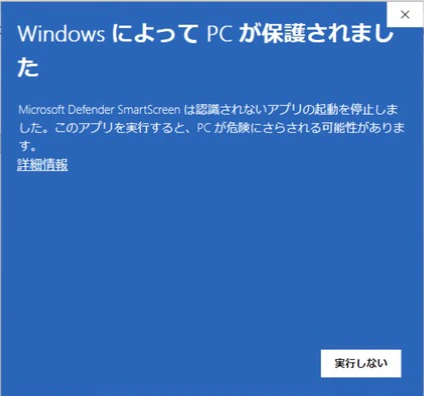
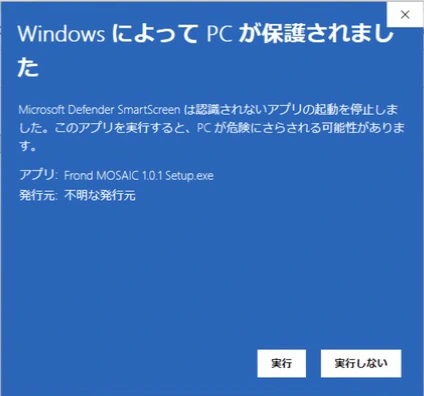
The pictures show Windows in Japanese: 詳細情報 is More info, 実行 is Run anyway.
Manuals
CUT — Questions
CUT FX plays out of time with my project. Doesn't it follow the project tempo?
It does: CUT FX cuts what comes into its track on your project's beats. It never stretches the sound, though, so the audio on that track has to play in the project's tempo first. Either set the project tempo to the loop's tempo, or let your DAW fit the clip to the project tempo:
- Ableton Live: turn on Warp for the clip (Clip View).
- Logic Pro: in the Region inspector, let the region follow the project tempo (Flex & Follow, or the Flex checkbox in some versions).
- REAPER: in Item Properties, set the playback rate so the loop fills its bars (a 96 BPM loop in a 120 BPM project: 1.25) and turn on "Preserve pitch when changing rate".
Frond CUT (the instrument) does not need this: it places each slice of the loop you load on your project's beats, so a loop at another tempo stays in time. If it counts the loop's bars wrongly (bars=… in [1]), set bars to the loop's real length.
MOSAIC — Questions
Q. Where does the audio I drag from MOSAIC (DRAG 8 BARS) go?
Fixed in MOSAIC 1.0.1: dragged audio is now kept in Music › Frond Grid › MOSAIC drags, and MOSAIC never deletes it. (If that folder cannot be written, it goes to Frond Grid › MOSAIC drags in your Application Support folder; on Windows, in %APPDATA%.) Update to 1.0.1 from your order page.
Audio you dragged with MOSAIC 1.0.0 was saved in a temporary folder, which macOS (and Windows) clear from time to time. A project that only points to that file can lose it later, so copy it into your project:
- Ableton Live: choose File › Collect All and Save. The audio is copied into the project's Samples › Collected folder.
- Logic Pro: choose File › Project Settings › Assets and turn on Copy audio files into project, then save. For audio you have already placed, choose File › Project Management › Consolidate. (If you don't see these, turn on Enable Complete Features in Logic Pro › Settings › Advanced.)
- Other DAWs: use the command that copies external audio files into the project (often called Collect, Consolidate or Copy external files), or bounce the clip to a new audio file.
If a clip dragged with 1.0.0 is already missing, open the MOSAIC that made it and drag 8 bars again.
How to uninstall Frond CUT (macOS)
Before you start, quit your DAW and the Frond CUT app. Items in /Library and /Applications ask for your administrator password when you move them to the Trash. In Finder, use Go › Go to Folder… to open each location.
Before you delete
- Projects that use Frond CUT or Frond CUT FX keep their CUT settings (and Frond CUT's loop, which is saved inside the project), but CUT no longer opens in them once it is removed. To keep the sound, bounce or freeze those tracks first. Installing CUT again brings them back.
- Audio you dragged out with DRAG 8 BARS is kept in
~/Music/Frond Grid/CUT drags. Your DAW projects may still play those files, so deleting them leaves gaps in those projects. - Your presets (
~/Music/Frond/Presets/CUTand~/Music/Frond/Presets/CUT FX) and your DRAG 8 BARS audio are not removed by the steps below. Delete them yourself only if you no longer need them. - CUT has no licence activation, so there is nothing to deactivate.
1. What the installer put on your Mac
Move these to the Trash (skip any part you chose not to install):
/Library/Audio/Plug-Ins/Components/Frond CUT.component(instrument, Audio Unit)/Library/Audio/Plug-Ins/Components/Frond CUT FX.component(effect, Audio Unit)/Library/Audio/Plug-Ins/VST3/Frond CUT.vst3(instrument, VST3)/Library/Audio/Plug-Ins/VST3/Frond CUT FX.vst3(effect, VST3)/Applications/Frond CUT.app(standalone app)/Library/Application Support/Frond Grid/CUT(the manual, the licence and the third-party notices)
Delete only the CUT folder inside Frond Grid: other Frond Grid products keep their files next to it. If Frond Grid is empty afterwards, you can delete it too.
2. What CUT creates in your home folder (only if you used it)
~/Library/Application Support/Frond Grid/CUT.settings: the help language you picked (English or Japanese), shared by Frond CUT and Frond CUT FX. Nothing else. Delete only this file: other Frond Grid products keep their own files in the same folder.~/Library/Application Support/Frond CUT.settings: the standalone app's audio settings (output, sample rate, buffer size), its window position and its last state, including the loop you loaded (this file can be tens of MB).~/Library/Application Support/Frond CUT.settings.damaged: only if the app once found the file above damaged and set it aside.~/Library/Preferences/com.frondgrid.cut.plist: settings macOS keeps for the standalone app (for example, the folder the Open dialog showed last).~/Music/Frond Grid/CUT drags/: the WAV files from DRAG 8 BARS (see "Before you delete"). When your DAW does not allow writing to Music, they are in~/Library/Application Support/Frond Grid/CUT drags/instead (a sandboxed DAW keeps them inside its own container).~/Music/Frond/Presets/CUT/and~/Music/Frond/Presets/CUT FX/: presets you saved.
~/Library is hidden in Finder: in Go › Go to Folder…, type the path as shown.
3. The installer's receipts
macOS keeps a record (a receipt) of each part the installer put on your Mac. After deleting the files, you can remove the six receipts in Terminal. Each command asks for your password:
sudo pkgutil --forget com.frondgrid.cut.pkg.au
sudo pkgutil --forget com.frondgrid.cut.pkg.fxau
sudo pkgutil --forget com.frondgrid.cut.pkg.vst3
sudo pkgutil --forget com.frondgrid.cut.pkg.fxvst3
sudo pkgutil --forget com.frondgrid.cut.pkg.app
sudo pkgutil --forget com.frondgrid.cut.pkg.resources
To check that none are left: pkgutil --pkgs | grep com.frondgrid.cut (no output means none).
How to uninstall Frond CUT (Windows)
Before you start, quit your DAW and the Frond CUT app.
Before you delete
- Projects that use Frond CUT or Frond CUT FX keep their CUT settings (and Frond CUT's loop, which is saved inside the project), but CUT no longer opens in them once it is removed. To keep the sound, render or freeze those tracks first. Installing CUT again brings them back.
- Audio you dragged out with DRAG 8 BARS is kept in
Music\Frond Grid\CUT drags. Your DAW projects may still play those files, so deleting them leaves gaps in those projects. - The uninstaller does not remove your presets, your DRAG 8 BARS audio or CUT's settings (see step 2). Delete them yourself only if you no longer need them.
- CUT has no licence activation, so there is nothing to deactivate.
1. Uninstall
- Windows 11: Start › Settings › Apps › Installed apps, find Frond CUT, click … and choose Uninstall.
- Windows 10: Start › Settings › Apps › Apps & features, click Frond CUT and choose Uninstall.
Windows asks for administrator permission. The uninstaller uses the language you picked when you installed, and removes:
C:\Program Files\Common Files\VST3\Frond CUT.vst3(instrument) andFrond CUT FX.vst3(effect)C:\Program Files\Frond Grid\Frond CUT(the standalone app, the manual, the licence, the third-party notices and the Windows notes)- Start › Frond Grid › Frond CUT, and Frond CUT's entry in the list of apps
2. What stays (made by CUT while you used it)
%APPDATA%\Frond Grid\CUT.settings: the help language you picked (English or Japanese), shared by Frond CUT and Frond CUT FX. Nothing else. Delete only this file: other Frond Grid products keep their own files in the same folder.%APPDATA%\Frond CUT\: the standalone app's settings,Frond CUT.settings(audio output, sample rate, buffer size, window position and its last state, including the loop you loaded), andFrond CUT.settings.damagedif the app once set a damaged file aside. This folder is CUT's only: you can delete the whole folder.Music\Frond Grid\CUT drags\: the WAV files from DRAG 8 BARS (see "Before you delete"). When your DAW does not allow writing to Music:%APPDATA%\Frond Grid\CUT drags\.Music\Frond\Presets\CUT\andMusic\Frond\Presets\CUT FX\: presets you saved.
To open a %APPDATA% location, type the path into the address bar of File Explorer. Music is your Music folder (C:\Users\<your name>\Music, unless you moved it).
How to uninstall Frond MOSAIC (macOS)
Before you start, quit your DAW and the Frond MOSAIC app. Items in /Library and /Applications ask for your administrator password when you move them to the Trash. In Finder, use Go › Go to Folder… to open each location.
Before you delete
- Your own loops and settings in the MOSAIC app go away too: the loop you loaded in the app, its audio settings and your HELP language.
- Your DAW projects keep their MOSAIC settings and loops (they are saved inside the project), but MOSAIC no longer opens in them once it is removed. To keep the sound, render or freeze those tracks first. Installing MOSAIC again brings them back.
- Your own sounds and presets in Music › Frond (
MOSAIC My Sounds,Presets/MOSAIC,Presets/MOSAIC FX) are not removed by the steps below. Delete them yourself only if you no longer need them. - Your DAW projects may use the audio you dragged with DRAG 8 BARS (step 2). Keep it while a project needs it.
- MOSAIC has no licence activation, so there is nothing to deactivate.
1. What the installer put on your Mac
Move these to the Trash:
/Library/Audio/Plug-Ins/Components/Frond MOSAIC.component(instrument, Audio Unit)/Library/Audio/Plug-Ins/Components/Frond MOSAIC FX.component(effect, Audio Unit)/Library/Audio/Plug-Ins/VST3/Frond MOSAIC.vst3(instrument, VST3)/Library/Audio/Plug-Ins/VST3/Frond MOSAIC FX.vst3(effect, VST3)/Applications/Frond MOSAIC.app(standalone app)/Library/Application Support/Frond Grid/MOSAIC(the sound library, the manual, the licence and the credits)
Delete only the MOSAIC folder inside Frond Grid: other Frond Grid products keep their files next to it. If Frond Grid is empty afterwards, you can delete it too.
2. What MOSAIC creates in your home folder
~/Library/Application Support/Frond MOSAIC.settings: the standalone app's audio settings (output, sample rate, buffer size) and its last state, including the loop you loaded.~/Library/Preferences/com.frondgrid.mosaic.plist: settings macOS keeps for the standalone app (for example, the folder the Open dialog showed last).~/Library/Frond/MOSAIC help language.txtand, if you ever chose the sound library's folder yourself,~/Library/Frond/MOSAIC materials folder.txt: your HELP language and that folder. Delete only these MOSAIC files: other Frond products may keep their own files in~/Library/Frond.~/Music/Frond Grid/MOSAIC drags/: the audio you dragged with DRAG 8 BARS (MOSAIC 1.0.1 and later). If that folder could not be written, it is~/Library/Application Support/Frond Grid/MOSAIC drags/. Delete it only when no DAW project uses that audio. Other Frond Grid products keep their own drags next to it inFrond Grid.
~/Library is hidden in Finder: in Go › Go to Folder…, type the path as shown.
3. The installer's receipts
macOS keeps a record (a receipt) of each part the installer put on your Mac. After deleting the files, you can remove the six receipts in Terminal. Each command asks for your password:
sudo pkgutil --forget com.frondgrid.mosaic.pkg.vst3
sudo pkgutil --forget com.frondgrid.mosaic.pkg.au
sudo pkgutil --forget com.frondgrid.mosaic.pkg.app
sudo pkgutil --forget com.frondgrid.mosaic.pkg.fxvst3
sudo pkgutil --forget com.frondgrid.mosaic.pkg.fxau
sudo pkgutil --forget com.frondgrid.mosaic.pkg.resources
To check that none are left: pkgutil --pkgs | grep com.frondgrid.mosaic (no output means none).
How to uninstall Frond MOSAIC (Windows)
Before you start, quit your DAW and the Frond MOSAIC app.
Before you delete
- Your DAW projects keep their MOSAIC settings and loops (they are saved inside the project), but MOSAIC no longer opens in them once it is removed. To keep the sound, render or freeze those tracks first. Installing MOSAIC again brings them back.
- The uninstaller does not remove your own sounds, your presets or MOSAIC's settings (see step 2). Delete them yourself only if you no longer need them.
- MOSAIC has no licence activation, so there is nothing to deactivate.
1. Uninstall
- Windows 11: Start › Settings › Apps › Installed apps, find Frond MOSAIC, click … and choose Uninstall.
- Windows 10: Start › Settings › Apps › Apps & features, click Frond MOSAIC and choose Uninstall.
Windows asks for administrator permission. The uninstaller uses the language you picked when you installed, and removes:
C:\Program Files\Common Files\VST3\Frond MOSAIC.vst3(instrument) andFrond MOSAIC FX.vst3(effect)C:\ProgramData\Frond Grid\MOSAIC(the sound library)C:\Program Files\Frond Grid\Frond MOSAIC(the standalone app, the manual, the licence, the third-party notices and the Windows notes)- Start › Frond Grid › Frond MOSAIC, and Frond MOSAIC's entry in the list of apps
2. What stays (made by MOSAIC while you used it)
%APPDATA%\Frond MOSAIC\: the standalone app's settings,Frond MOSAIC.settings(audio output, sample rate, buffer size and its last state, including the loop you loaded). This folder is MOSAIC's only: you can delete the whole folder.%APPDATA%\Frond\MOSAIC help language.txt: your HELP language. And, if you ever chose the sound library's folder yourself,%APPDATA%\Frond\MOSAIC materials folder.txt: that folder. Delete only these MOSAIC files: other Frond products may keep their own files in%APPDATA%\Frond.Music\Frond\MOSAIC My Sounds\: your own sounds.Music\Frond\Presets\MOSAIC\andMusic\Frond\Presets\MOSAIC FX\: presets you saved.
To open a %APPDATA% location, type the path into the address bar of File Explorer. Music is your Music folder (C:\Users\<your name>\Music, unless you moved it).
How to uninstall Frond SPRIG (macOS)
1. What the installer puts on your Mac
| Path | What it is |
|---|---|
/Library/Audio/Plug-Ins/Components/Frond SPRIG.component | Frond SPRIG, Audio Unit instrument |
/Library/Audio/Plug-Ins/Components/Frond SPRIG MIDI.component | Frond SPRIG MIDI, Audio Unit MIDI effect (Logic Pro's MIDI FX slot) |
/Library/Audio/Plug-Ins/VST3/Frond SPRIG.vst3 | Frond SPRIG, VST3 instrument |
/Applications/Frond SPRIG.app | Frond SPRIG, standalone app |
/Library/Application Support/Frond Grid/SPRIG/ | The manual (sprig_EN.txt, sprig_JA.txt), the licence (EULA_PLUGINS_EN.txt, EULA_PLUGINS_JA.txt) and the third-party notices (THIRD_PARTY_NOTICES_SPRIG.txt) |
The built-in sounds are inside each plug-in and the app (no separate sound folder).
2. Files SPRIG makes in your home folder (only if you used it)
| Path | What it is |
|---|---|
~/Library/Application Support/Frond Grid/SPRIG.settings | The language you picked (English or Japanese) for the next SPRIG you add. Nothing else. |
~/Library/Application Support/Frond SPRIG.settings | The standalone app's settings: audio and MIDI output devices, window position, and the app's last SPRIG settings. |
…/SPRIG.settings.damaged, …/Frond SPRIG.settings.damaged | Only if SPRIG once found the file above damaged and set it aside. |
~/Music/Frond Grid/SPRIG drags/ | WAV files you dragged from SPRIG into a DAW (the DAW project may still use them). When a DAW does not allow writing to Music: ~/Library/Application Support/Frond Grid/SPRIG drags/. A sandboxed DAW keeps these inside its own container. |
| Files you saved yourself | MIDI files from Save MIDI, and states from the app's Options > Save current state…, wherever you chose to save them. |
SPRIG has no user preset folder: its presets are built in, and a DAW project keeps SPRIG's settings inside the project. MIDI and WAV files made for dragging are first written to the system's temporary folder (Frond SPRIG), which macOS clears by itself.
3. Installer receipts
SPRIG's installer leaves five receipts. To see them: pkgutil --pkgs | grep com.frondgrid.sprig
com.frondgrid.sprig.pkg.app
com.frondgrid.sprig.pkg.au
com.frondgrid.sprig.pkg.midiau
com.frondgrid.sprig.pkg.vst3
com.frondgrid.sprig.pkg.resources
To see the files of one: pkgutil --files com.frondgrid.sprig.pkg.au
After deleting the files, remove the receipts (this deletes no files):
sudo pkgutil --forget com.frondgrid.sprig.pkg.app
sudo pkgutil --forget com.frondgrid.sprig.pkg.au
sudo pkgutil --forget com.frondgrid.sprig.pkg.midiau
sudo pkgutil --forget com.frondgrid.sprig.pkg.vst3
sudo pkgutil --forget com.frondgrid.sprig.pkg.resources
4. Before you delete
- Quit your DAW and the Frond SPRIG app first.
- Projects that use SPRIG will open without it. SPRIG's settings stay saved in the project and come back if you install SPRIG again.
- To keep the sound, bounce (export) or freeze the track first. SPRIG also gives MIDI: you can put its notes on a MIDI track instead (drag MIDI or the take onto a track). Installing SPRIG again brings everything back.
- SPRIG has no licence activation, so there is nothing to deactivate.
- WAV files in
SPRIG dragsmay be used by your DAW projects. Delete them only if no project needs them. - Delete only the SPRIG items. Other Frond Grid products use the same
Frond Gridfolders (/Library/Application Support/Frond Grid/,~/Library/Application Support/Frond Grid/,~/Music/Frond Grid/): do not delete those folders as a whole. - Deleting from
/Libraryand/Applicationsasks for an administrator password. - In Finder, drag each item in section 1 to the Trash (Go > Go to Folder… to open
/Library/Audio/Plug-Ins/Componentsand the others), then empty the Trash. Restart your DAW afterwards so it forgets SPRIG.
How to uninstall Frond SPRIG (Windows)
Before you start, quit your DAW and the Frond SPRIG app.
Before you delete
- Projects that use SPRIG keep their SPRIG settings (they are saved inside the project), but SPRIG no longer opens in them once it is removed. To keep the music, render the track, or drag SPRIG's MIDI into the project first. Installing SPRIG again brings them back.
- WAV files you dragged from SPRIG are kept in
Music\Frond Grid\SPRIG drags. Your DAW projects may still play those files, so deleting them leaves gaps in those projects. - The uninstaller does not remove your dragged audio or SPRIG's settings (see step 2). Delete them yourself only if you no longer need them.
- SPRIG has no licence activation, so there is nothing to deactivate.
1. Uninstall
- Windows 11: Start › Settings › Apps › Installed apps, find Frond SPRIG, click … and choose Uninstall.
- Windows 10: Start › Settings › Apps › Apps & features, click Frond SPRIG and choose Uninstall.
Windows asks for administrator permission. The uninstaller uses the language you picked when you installed, and removes:
C:\Program Files\Common Files\VST3\Frond SPRIG.vst3(with its built-in sounds)C:\Program Files\Frond Grid\Frond SPRIG(the standalone app and its built-in sounds, the manual, the licence, the third-party notices and the Windows notes)- Start › Frond Grid › Frond SPRIG, and Frond SPRIG's entry in the list of apps
2. What stays (made by SPRIG while you used it)
%APPDATA%\Frond Grid\SPRIG.settings: the language you picked (English or Japanese) for the next SPRIG you add. Nothing else. Delete only this file: other Frond Grid products keep their own files in the same folder.SPRIG.settings.damagedis there only if SPRIG once set a damaged file aside.%APPDATA%\Frond SPRIG\: the standalone app's settings,Frond SPRIG.settings(audio and MIDI output devices, window position and the app's last SPRIG settings), andFrond SPRIG.settings.damagedif the app once set a damaged file aside. This folder is SPRIG's only: you can delete the whole folder.Music\Frond Grid\SPRIG drags\: WAV files you dragged from SPRIG into a DAW (see "Before you delete"). When your DAW does not allow writing to Music:%APPDATA%\Frond Grid\SPRIG drags\.%TEMP%\Frond SPRIG\: MIDI and WAV files SPRIG makes while you drag. Windows does not always clear this folder by itself; you can delete it while no DAW is open.- Files you saved yourself (MIDI from Save MIDI, states from the app's Options › Save current state…), wherever you saved them.
SPRIG has no preset folder: its presets are built in.
To open a %APPDATA% or %TEMP% location, type the path into the address bar of File Explorer. Music is your Music folder (C:\Users\<your name>\Music, unless you moved it).
How to uninstall Frond WEFT (macOS)
For Frond WEFT 1.0.1, installed with the macOS installer (Frond-WEFT-1.0.1-macOS.pkg).
Before you start
- Quit your DAW and the Frond WEFT app.
- Projects that use WEFT keep WEFT's settings inside the project. Without WEFT installed they open without its sound. To keep the sound, bounce or freeze those tracks first. If you install WEFT again, the sound comes back.
- WEFT has no licence activation, so there is nothing to deactivate.
- Your own presets, DRAG 8 BARS recordings and the app's audio settings are kept in separate places (section 2). If you delete them, they are gone. Keep them if you may install WEFT again.
- The Frond Grid folders are shared with other Frond Grid products. Delete only the WEFT items listed here, not the whole Frond Grid folder.
1. What the installer put on your Mac
Move these to the Trash (Finder will ask for your administrator password):
| Item | Path |
|---|---|
| Audio Unit plug-in | /Library/Audio/Plug-Ins/Components/Frond WEFT.component |
| VST3 plug-in | /Library/Audio/Plug-Ins/VST3/Frond WEFT.vst3 |
| Standalone app | /Applications/Frond WEFT.app |
| Manual, licence and third-party notices | /Library/Application Support/Frond Grid/WEFT/ (only the WEFT folder) |
The WEFT folder holds five text files: weft_EN.txt, weft_JA.txt, EULA_PLUGINS_EN.txt, EULA_PLUGINS_JA.txt and THIRD_PARTY_NOTICES_WEFT.txt.
Then restart your DAW, or rescan its plug-ins. If WEFT still shows in the list, restart the Mac.
2. What WEFT made while you used it (in your home folder)
These are yours. The installer did not put them there, and removing WEFT does not delete them. Delete them only if you don't want them.
| Item | Path | What is inside |
|---|---|---|
| Your presets | ~/Library/Audio/Presets/Frond Grid/weft/ | Presets you saved with "Save preset" (.fgpreset files). Only exists if you saved one. |
| DRAG 8 BARS recordings | ~/Music/Frond Grid/weft takes/ | The audio files WEFT wrote when you used DRAG 8 BARS (weft take <date> <time> <id>.wav). |
| DRAG 8 BARS recordings (only if your DAW could not write to Music) | ~/Library/Application Support/Frond Grid/weft takes/ | The same kind of files. |
| Standalone app settings | ~/Library/Application Support/Frond WEFT.settings | The app's audio and MIDI device, sample rate, buffer size, window position, and the sound it last played. |
| Set-aside settings (only if one was damaged) | ~/Library/Application Support/Frond WEFT.settings.damaged | A damaged settings file the app set aside. |
~ is your home folder. In Finder choose Go > Go to Folder and paste the path.
WEFT creates no file in ~/Library/Preferences.
3. Installer receipts
macOS keeps a receipt for each part the installer put in. Removing the files does not remove the receipts. They do no harm, but you can remove them.
List them:
pkgutil --pkgs | grep com.frondgrid.weftWEFT has four:
com.frondgrid.weft.pkg.vst3com.frondgrid.weft.pkg.aucom.frondgrid.weft.pkg.appcom.frondgrid.weft.pkg.resources
Forget them, one command each:
sudo pkgutil --forget com.frondgrid.weft.pkg.vst3
sudo pkgutil --forget com.frondgrid.weft.pkg.au
sudo pkgutil --forget com.frondgrid.weft.pkg.app
sudo pkgutil --forget com.frondgrid.weft.pkg.resources
--forget removes only the receipt, not any file.
How to uninstall Frond WEFT (Windows)
Before you start, quit your DAW and the Frond WEFT app.
Before you delete
- Projects that use WEFT keep their WEFT settings (they are saved inside the project), but WEFT no longer opens in them once it is removed. To keep the sound, render or freeze those tracks first. Installing WEFT again brings them back.
- Audio you dragged out with DRAG 8 BARS is kept in
Music\Frond Grid\weft takes. Your DAW projects may still play those files, so deleting them leaves gaps in those projects. - The uninstaller does not remove your presets, your DRAG 8 BARS audio or WEFT's settings (see step 2). Delete them yourself only if you no longer need them.
- WEFT has no licence activation, so there is nothing to deactivate.
1. Uninstall
- Windows 11: Start › Settings › Apps › Installed apps, find Frond WEFT, click … and choose Uninstall.
- Windows 10: Start › Settings › Apps › Apps & features, click Frond WEFT and choose Uninstall.
Windows asks for administrator permission. The uninstaller uses the language you picked when you installed, and removes:
C:\Program Files\Common Files\VST3\Frond WEFT.vst3C:\Program Files\Frond Grid\Frond WEFT(the standalone app, the manual, the licence, the third-party notices and the Windows notes)- Start › Frond Grid › Frond WEFT, and Frond WEFT's entry in the list of apps
2. What stays (made by WEFT while you used it)
Music\Frond Grid\Presets\weft\: presets you saved with "Save preset" (.fgpresetfiles). Only there if you saved one.Music\Frond Grid\weft takes\: the WAV files from DRAG 8 BARS (see "Before you delete"). When your DAW does not allow writing to Music:%APPDATA%\Frond Grid\weft takes\.%APPDATA%\Frond WEFT\: the standalone app's settings,Frond WEFT.settings(audio and MIDI devices, sample rate, buffer size, window position and the sound it last played), andFrond WEFT.settings.damagedif the app once set a damaged file aside. This folder is WEFT's only: you can delete the whole folder.
To open a %APPDATA% location, type the path into the address bar of File Explorer. Music is your Music folder (C:\Users\<your name>\Music, unless you moved it).
How to uninstall Frond BUBBLE STUDIO (macOS)
1. What the installer puts on your Mac
| Path | What it is |
|---|---|
/Library/Audio/Plug-Ins/Components/Bubble Studio.component | Bubble Studio, Audio Unit instrument |
/Library/Audio/Plug-Ins/Components/Bubble Studio FX.component | Bubble Studio FX, Audio Unit effect |
/Library/Audio/Plug-Ins/VST3/Bubble Studio.vst3 | Bubble Studio, VST3 instrument |
/Library/Audio/Plug-Ins/VST3/Bubble Studio FX.vst3 | Bubble Studio FX, VST3 effect |
/Applications/Bubble Studio.app | Bubble Studio, standalone app |
/Library/Application Support/Frond Grid/Bubble Studio/ | The manual (Bubble-Studio-Manual-EN.txt, Bubble-Studio-Manual-JA.txt, START-HERE-EN.txt, START-HERE-JA.txt), the licence (EULA_PLUGINS_EN.txt, EULA_PLUGINS_JA.txt) and the third-party notices (THIRD_PARTY_NOTICES.txt) |
The sounds are made inside each plug-in and the app (no separate sound folder).
2. Files Bubble Studio makes in your home folder (only if you used it)
| Path | What it is |
|---|---|
~/Library/Application Support/Bubble Studio.settings | The standalone app's settings: audio and MIDI devices, window position, and the app's last Bubble Studio settings. |
| Files you saved yourself | States from the app's Options > Save current state…, wherever you chose to save them. |
Bubble Studio has no preset folder: its starting points are built in, and a DAW project keeps its settings inside the project.
3. Installer receipts
Bubble Studio's installer leaves six receipts. To see them: pkgutil --pkgs | grep com.frondgrid.bubblestudio
com.frondgrid.bubblestudio.pkg.app
com.frondgrid.bubblestudio.pkg.au
com.frondgrid.bubblestudio.pkg.fxau
com.frondgrid.bubblestudio.pkg.vst3
com.frondgrid.bubblestudio.pkg.fx
com.frondgrid.bubblestudio.pkg.resources
To see the files of one: pkgutil --files com.frondgrid.bubblestudio.pkg.au
After deleting the files, remove the receipts (this deletes no files):
sudo pkgutil --forget com.frondgrid.bubblestudio.pkg.app
sudo pkgutil --forget com.frondgrid.bubblestudio.pkg.au
sudo pkgutil --forget com.frondgrid.bubblestudio.pkg.fxau
sudo pkgutil --forget com.frondgrid.bubblestudio.pkg.vst3
sudo pkgutil --forget com.frondgrid.bubblestudio.pkg.fx
sudo pkgutil --forget com.frondgrid.bubblestudio.pkg.resources
4. Before you delete
- Quit your DAW and the Bubble Studio app first.
- Projects that use Bubble Studio will open without it. Its settings stay saved in the project and come back if you install it again.
- To keep the sound, bounce (export) or freeze the track first. Installing Bubble Studio again brings everything back.
- Bubble Studio has no licence activation, so there is nothing to deactivate.
- Delete only the Bubble Studio items. Other Frond Grid products use the same
Frond Gridfolder (/Library/Application Support/Frond Grid/): do not delete that folder as a whole. - Deleting from
/Libraryand/Applicationsasks for an administrator password. - In Finder, drag each item in section 1 to the Trash (Go > Go to Folder… to open
/Library/Audio/Plug-Ins/Componentsand the others), then empty the Trash. Restart your DAW afterwards so it forgets Bubble Studio.
How to uninstall Bubble Studio (Windows)
Before you start, quit your DAW and the Bubble Studio app.
Before you delete
- Projects that use Bubble Studio keep its settings (they are saved inside the project), but Bubble Studio no longer opens in them once it is removed. To keep the music, render the track first. Installing Bubble Studio again brings them back.
- Bubble Studio has no licence activation, so there is nothing to deactivate.
1. Uninstall
- Windows 11: Start › Settings › Apps › Installed apps, find Bubble Studio, click … and choose Uninstall.
- Windows 10: Start › Settings › Apps › Apps & features, click Bubble Studio and choose Uninstall.
Windows asks for administrator permission. The uninstaller removes:
C:\Program Files\Common Files\VST3\Bubble Studio.vst3andC:\Program Files\Common Files\VST3\Bubble Studio FX.vst3C:\Program Files\Frond Grid\Bubble Studio(the standalone app, the manual, the licence, the third-party notices and the Windows notes)- Start › Frond Grid › Bubble Studio, and Bubble Studio's entry in the list of apps
2. What stays (made by Bubble Studio while you used it)
%APPDATA%\Bubble Studio\: the standalone app's settings,Bubble Studio.settings(audio and MIDI devices, window position and the app's last Bubble Studio settings). This folder is Bubble Studio's only: you can delete the whole folder.- Files you saved yourself (states from the app's Options › Save current state…), wherever you saved them.
Bubble Studio has no preset folder: its starting points are built in.
To open a %APPDATA% location, type the path into the address bar of File Explorer.
How to uninstall Frond ODD PARTS (macOS)
1. What the installer puts on your Mac
| Path | What it is |
|---|---|
/Library/Audio/Plug-Ins/Components/Frond Odd Parts.component | Frond Odd Parts, Audio Unit instrument |
/Library/Audio/Plug-Ins/Components/Frond Odd Parts FX.component | Frond Odd Parts FX, Audio Unit effect |
/Library/Audio/Plug-Ins/VST3/Frond Odd Parts.vst3 | Frond Odd Parts, VST3 instrument |
/Library/Audio/Plug-Ins/VST3/Frond Odd Parts FX.vst3 | Frond Odd Parts FX, VST3 effect |
/Applications/Frond Odd Parts.app | Frond Odd Parts, standalone app |
/Library/Application Support/Frond Grid/Odd Parts/ | The manuals (manuals/Odd-Parts-1.0.8-Manual-EN.txt, manuals/Odd-Parts-1.0.8-Manual-JA.txt), the licence (EULA_PLUGINS_EN.txt, EULA_PLUGINS_JA.txt) and the font licence (FONT_LICENSE.txt) |
The 119 circuits are built into each plug-in and the app (no separate circuit folder).
2. Files Odd Parts makes in your home folder (only if you used it)
| Path | What it is |
|---|---|
~/Library/Application Support/Frond Grid/Odd Parts/presets/ | MY SOUNDS: the sounds you kept with SAVE (.fgpreset files). Shared by the plug-ins and the app. Copy this folder first if you want to keep them. |
~/Music/Frond Grid/Odd Parts/ | Your REC takes (WAV files). Keep them if you used them in projects. |
~/Library/Application Support/Frond Odd Parts.settings | The standalone app's settings: audio and MIDI devices and window position. |
~/Library/WebKit/com.frondgrid.oddparts and ~/Library/Caches/com.frondgrid.oddparts | Small files macOS keeps for the standalone app's screen. |
A DAW project keeps the circuit and every setting inside the project.
3. Installer receipts
The Odd Parts installer leaves six receipts. To see them: pkgutil --pkgs | grep com.frondgrid.oddparts
com.frondgrid.oddparts.pkg.vst3
com.frondgrid.oddparts.pkg.au
com.frondgrid.oddparts.pkg.fxvst3
com.frondgrid.oddparts.pkg.fxau
com.frondgrid.oddparts.pkg.app
com.frondgrid.oddparts.pkg.resources
To see the files of one: pkgutil --files com.frondgrid.oddparts.pkg.au
After deleting the files, remove the receipts (this deletes no files):
sudo pkgutil --forget com.frondgrid.oddparts.pkg.vst3
sudo pkgutil --forget com.frondgrid.oddparts.pkg.au
sudo pkgutil --forget com.frondgrid.oddparts.pkg.fxvst3
sudo pkgutil --forget com.frondgrid.oddparts.pkg.fxau
sudo pkgutil --forget com.frondgrid.oddparts.pkg.app
sudo pkgutil --forget com.frondgrid.oddparts.pkg.resources
4. Before you delete
- Quit your DAW and the Odd Parts app first.
- Projects that use Odd Parts will open without it. The circuit and its settings stay saved in the project and come back if you install it again.
- To keep the sound, bounce (export) or freeze the track first.
- MY SOUNDS are not removed by deleting the items in section 1. Delete
~/Library/Application Support/Frond Grid/Odd Parts/presets/only if you no longer want them. - Odd Parts has no licence activation, so there is nothing to deactivate.
- Delete only the Odd Parts items. Other Frond Grid products use the same
Frond Gridfolders (/Library/Application Support/Frond Grid/and~/Library/Application Support/Frond Grid/): do not delete those folders as a whole. - Deleting from
/Libraryand/Applicationsasks for an administrator password. - In Finder, drag each item in section 1 to the Trash (Go > Go to Folder… to open
/Library/Audio/Plug-Ins/Componentsand the others), then empty the Trash. Restart your DAW afterwards so it forgets Odd Parts.
How to uninstall Frond Odd Parts (Windows)
Before you start, quit your DAW and the Frond Odd Parts app.
Before you delete
- Projects that use Odd Parts keep its circuit and settings (they are saved inside the project), but Odd Parts no longer opens in them once it is removed. To keep the music, render the track first. Installing Odd Parts again brings them back.
- MY SOUNDS (the sounds you kept with SAVE) are not removed by the uninstaller. See section 2.
- Odd Parts has no licence activation, so there is nothing to deactivate.
1. Uninstall
- Windows 11: Start › Settings › Apps › Installed apps, find Frond Odd Parts, click … and choose Uninstall.
- Windows 10: Start › Settings › Apps › Apps & features, click Frond Odd Parts and choose Uninstall.
Windows asks for administrator permission. The uninstaller removes:
C:\Program Files\Common Files\VST3\Frond Odd Parts.vst3andC:\Program Files\Common Files\VST3\Frond Odd Parts FX.vst3C:\Program Files\Frond Grid\Frond Odd Parts(the standalone app, the manuals, the licence, the font licence, the third-party notices and the Windows notes)- Start › Frond Grid › Frond Odd Parts, and Frond Odd Parts' entry in the list of apps
2. What stays (made by Odd Parts while you used it)
%APPDATA%\Frond Grid\Odd Parts\presets\: MY SOUNDS (.fgpresetfiles), shared by the plug-ins and the app. Copy this folder first if you want to keep them; delete it only if you no longer want them.%APPDATA%\Frond Grid\Odd Parts WebView2\: files Windows keeps for Odd Parts' screen. You can delete this folder.%APPDATA%\Frond Odd Parts\: the standalone app's settings,Frond Odd Parts.settings(audio and MIDI devices and window position). This folder is Odd Parts' only: you can delete the whole folder.
Other Frond Grid products use the same %APPDATA%\Frond Grid\ folder: delete only the Odd Parts folders inside it, not Frond Grid as a whole.
To open a %APPDATA% location, type the path into the address bar of File Explorer.
How to uninstall Frond SIX MATERIALS (macOS)
1. What the installer puts on your Mac
Six instruments: Tension, Strata, Mineral, Reed, Facet and Fold. Each comes in three forms (only the ones you chose under Customize are installed).
| Path | What it is |
|---|---|
/Library/Audio/Plug-Ins/Components/Frond Tension.component (and Frond Strata, Frond Mineral, Frond Reed, Frond Facet, Frond Fold) | the six Audio Unit instruments |
/Library/Audio/Plug-Ins/VST3/Frond Tension.vst3 (and the other five) | the six VST3 instruments |
/Applications/Frond Tension.app (and the other five) | the six standalone apps |
/Library/Application Support/Frond Grid/Six Materials/ | The manual (Six-Materials-1.0.0-Manual-EN.txt, Six-Materials-1.0.0-Manual-JA.txt, START-HERE-EN.txt, START-HERE-JA.txt), the comparison MIDI (Six-Materials-Phrase-120bpm.mid), the licence (EULA_PLUGINS_EN.txt, EULA_PLUGINS_JA.txt) and the third-party notices (THIRD_PARTY_NOTICES.txt) |
The sounds are made inside each plug-in and app (no separate sound folder).
2. Files Six Materials makes in your home folder (only if you used it)
| Path | What it is |
|---|---|
~/Library/Application Support/Frond Tension.settings (one per app you opened) | A standalone app's settings: audio and MIDI devices, window position and its last sound. |
~/Music/Frond/Presets/Six Materials/ | Your own sounds (Save, MY SOUNDS), as .fgpreset files. |
~/Music/Frond Grid/Six Materials Takes/ | Your recordings (REC), as WAV files. |
~/Library/Caches/com.frondgrid.sixmaterials.tension and ~/Library/WebKit/com.frondgrid.sixmaterials.tension (one pair per app, if present) | Data macOS keeps for the app's window. |
A DAW project keeps its Six Materials settings inside the project.
3. Installer receipts
The installer leaves one receipt per instrument and form (up to 18) plus one for the documents. To see them: pkgutil --pkgs | grep com.frondgrid.sixmaterials
com.frondgrid.sixmaterials.pkg.tension.app
com.frondgrid.sixmaterials.pkg.tension.au
com.frondgrid.sixmaterials.pkg.tension.vst3
… the same for strata, mineral, reed, facet and fold …
com.frondgrid.sixmaterials.pkg.resources
To see the files of one: pkgutil --files com.frondgrid.sixmaterials.pkg.tension.au
After deleting the files, remove all the receipts at once (this deletes no files):
for p in $(pkgutil --pkgs | grep '^com\.frondgrid\.sixmaterials\.'); do sudo pkgutil --forget "$p"; done4. Before you delete
- Quit your DAW and the Six Materials apps first.
- Projects that use Six Materials will open without it. Its settings stay saved in the project and come back if you install it again.
- To keep the sound, bounce (export) or freeze the track first.
- Your sounds and recordings in
~/Musicare yours: keep them if you may reinstall, or copy them elsewhere first. - Six Materials has no licence activation, so there is nothing to deactivate.
- Delete only the Six Materials items. Other Frond Grid products use the same
Frond Gridfolders (/Library/Application Support/Frond Grid/,~/Music/Frond/,~/Music/Frond Grid/): do not delete those folders as a whole. - Deleting from
/Libraryand/Applicationsasks for an administrator password. - In Finder, drag each item in section 1 to the Trash (Go > Go to Folder… to open
/Library/Audio/Plug-Ins/Componentsand the others), then empty the Trash. Restart your DAW afterwards so it forgets Six Materials.
How to uninstall Six Materials (Windows)
Before you start, quit your DAW and the Six Materials apps.
Before you delete
- Projects that use Six Materials keep its settings (they are saved inside the project), but the instruments no longer open in them once they are removed. To keep the music, render the track first. Installing Six Materials again brings them back.
- Six Materials has no licence activation, so there is nothing to deactivate.
1. Uninstall
- Windows 11: Start › Settings › Apps › Installed apps, find Six Materials, click … and choose Uninstall.
- Windows 10: Start › Settings › Apps › Apps & features, click Six Materials and choose Uninstall.
Windows asks for administrator permission. The uninstaller removes:
C:\Program Files\Common Files\VST3\Frond Tension.vst3and the other five (Frond Strata,Frond Mineral,Frond Reed,Frond Facet,Frond Fold)C:\Program Files\Frond Grid\Six Materials(the six standalone apps, the manual, the comparison MIDI, the licence, the third-party notices and the Windows notes)- Start › Frond Grid › Six Materials, and Six Materials' entry in the list of apps
2. What stays (made by Six Materials while you used it)
%APPDATA%\Frond Tension.settingsand the same for the other apps you opened: the standalone apps' settings (audio and MIDI devices, window position, last sound).%APPDATA%\Frond Grid\Six Materials\WebView2\: data Windows keeps for the apps' windows. This folder is Six Materials' only: you can delete it.Music\Frond\Presets\Six Materials\: your own sounds (Save, MY SOUNDS).Music\Frond Grid\Six Materials Takes\: your recordings (REC).
Keep your sounds and recordings if you may reinstall. Other Frond Grid products use the same Frond Grid and Frond folders: delete only the Six Materials items.
To open a %APPDATA% location, type the path into the address bar of File Explorer.
How to uninstall Frond FIELD (macOS)
1. What the installer puts on your Mac
| Path | What it is |
|---|---|
/Applications/Frond FIELD.app | Frond FIELD, standalone app. The demo tracks, sounds, starter sessions and the third-party notices (NOTICES.txt) are inside the app. |
FIELD is not a plug-in: nothing is installed in /Library/Audio/Plug-Ins.
2. Files FIELD makes in your home folder (only if you used it)
| Path | What it is |
|---|---|
~/Library/Application Support/Frond Grid/Field/Last Session.fieldsession | Your last session, saved every few seconds and when you quit, so FIELD opens where you left off. |
~/Library/Application Support/Frond Grid/Field/Last Session (unreadable).fieldsession | Only if FIELD once found the file above damaged and set it aside. |
~/Library/Preferences/com.frondgrid.field.plist | The Open Recent list and the window's size and position. |
~/Library/Caches/com.frondgrid.field/, ~/Library/WebKit/com.frondgrid.field/ | Temporary data for the window's display, made by macOS (if present). |
| Files you saved yourself | Session files (.fieldsession) and recordings (.wav), wherever you chose to save them. |
3. Installer receipt
FIELD's installer leaves one receipt. To see it: pkgutil --pkgs | grep com.frondgrid.field
com.frondgrid.field.pkgTo see its files: pkgutil --files com.frondgrid.field.pkg
After deleting the app, remove the receipt (this deletes no files):
sudo pkgutil --forget com.frondgrid.field.pkg4. Before you delete
- Quit Frond FIELD first. It saves your last session when it quits.
- Your own session files and recordings are not touched. Keep them if you may install FIELD again: sessions open in any later version.
- FIELD has no licence activation, so there is nothing to deactivate.
- Delete only the FIELD items. Other Frond Grid products use the same
Frond Gridfolder (~/Library/Application Support/Frond Grid/): delete only theFieldfolder inside it, not the whole folder. - Deleting from
/Applicationsmay ask for an administrator password. - In Finder, drag
Frond FIELD.appfrom Applications to the Trash, then empty the Trash. To remove the files in section 2, use Go > Go to Folder… with each path.
How to uninstall Frond FIELD (Windows)
To remove FIELD:
  1. Quit FIELD (File > Exit).
  2. Windows 11: Settings > Apps > Installed apps > "Frond FIELD" > ... > Uninstall.
     Windows 10: Settings > Apps > Apps & features > "Frond FIELD" > Uninstall.
     (Or run "Uninstall Frond FIELD.exe" in C:\Program Files\Frond Grid\Frond FIELD.)
  3. Follow the uninstaller. It removes the app, its folder, the Start menu entry and the .fieldsession link.
These stay when you remove FIELD (they are yours). Delete them by hand if you want them gone:
  Your last session, Open Recent and the window's size:  %APPDATA%\Frond Grid\Field\
  The screen's browser data (safe to delete):            %LOCALAPPDATA%\Frond Grid\Field\WebView2\
  Takes written for DRAG WAV (safe to delete):           %TEMP%\Field takes\
  Your saved sessions and exported WAV files:            wherever you saved them
(Paste a line such as %APPDATA%\Frond Grid into the File Explorer address bar to open it.)
How to uninstall Frond RELAY (macOS)
1. What the installer puts on your Mac
| Path | What it is |
|---|---|
/Library/Audio/Plug-Ins/Components/Frond Relay.component | Frond Relay, Audio Unit instrument |
/Library/Audio/Plug-Ins/VST3/Frond Relay.vst3 | Frond Relay, VST3 instrument |
/Applications/Frond Grid/Frond Relay.app | Frond Relay, standalone app |
/Library/Application Support/Frond Grid/Relay/ | The manual (Frond-Relay-Manual-EN.txt, Frond-Relay-Manual-JA.txt), the licence (EULA_PLUGINS_EN.txt, EULA_PLUGINS_JA.txt) and the third-party notices (THIRD_PARTY_NOTICES_RELAY.txt) |
All drum sounds are synthesised inside the plug-ins and the app (no sound folder).
2. Files Relay makes in your home folder (only if you used it)
| Path | What it is |
|---|---|
~/Library/Application Support/Frond Grid/Relay.settings | The help language you picked (English or Japanese). Nothing else. |
~/Library/Application Support/Frond Relay.settings | The standalone app's settings: audio and MIDI devices, window position, and the app's last Relay state. |
…/Frond Relay.settings.damaged | Only if Relay once found the file above damaged and set it aside. |
~/Music/Frond Grid/Relay recordings/ | Takes you recorded with Record (24-bit WAV). When Music cannot be written: ~/Library/Application Support/Frond Grid/Relay recordings/. |
Relay has no preset folder: a DAW project keeps Relay's network and settings inside the project.
3. Installer receipts
Relay's installer leaves four receipts. To see them: pkgutil --pkgs | grep com.frondgrid.relay
com.frondgrid.relay.pkg.relay.app
com.frondgrid.relay.pkg.relay.au
com.frondgrid.relay.pkg.relay.vst3
com.frondgrid.relay.pkg.resources
To see the files of one: pkgutil --files com.frondgrid.relay.pkg.relay.au
After deleting the files, remove the receipts (this deletes no files):
sudo pkgutil --forget com.frondgrid.relay.pkg.relay.app
sudo pkgutil --forget com.frondgrid.relay.pkg.relay.au
sudo pkgutil --forget com.frondgrid.relay.pkg.relay.vst3
sudo pkgutil --forget com.frondgrid.relay.pkg.resources
4. Before you delete
- Quit your DAW and the Frond Relay app first.
- Projects that use Relay will open without it. Relay's network and settings stay saved in the project and come back if you install Relay again.
- To keep the sound, bounce (export) or freeze the track first.
- Relay has no licence activation, so there is nothing to deactivate.
- Takes in
Relay recordingsare your files; delete them only if you no longer need them. - Delete only the Relay items. Other Frond Grid products use the same
Frond Gridfolders (/Library/Application Support/Frond Grid/,~/Library/Application Support/Frond Grid/,~/Music/Frond Grid/,/Applications/Frond Grid/): do not delete those folders as a whole. - Deleting from
/Libraryand/Applicationsasks for an administrator password. - In Finder, drag each item in section 1 to the Trash (Go > Go to Folder… to open
/Library/Audio/Plug-Ins/Componentsand the others), then empty the Trash. Restart your DAW afterwards so it forgets Relay.
How to uninstall Frond Relay (Windows)
Before you start, quit your DAW and the Frond Relay app.
Before you delete
- Projects that use Relay keep its settings, the map and your own sounds (they are saved inside the project), but Relay no longer opens in them once it is removed. To keep the music, render the track first. Installing Relay again brings them back.
- Relay has no licence activation, so there is nothing to deactivate.
1. Uninstall
- Windows 11: Start › Settings › Apps › Installed apps, find Frond Relay, click … and choose Uninstall.
- Windows 10: Start › Settings › Apps › Apps & features, click Frond Relay and choose Uninstall.
Windows asks for administrator permission. The uninstaller removes:
C:\Program Files\Common Files\VST3\Frond Relay.vst3C:\Program Files\Frond Grid\Frond Relay(the standalone app, the manual, the licence, the third-party notices and the Windows notes)- Start › Frond Grid › Frond Relay, and Relay's entry in the list of apps
2. What stays (made by Relay while you used it)
%APPDATA%\Frond Relay.settings: the standalone app's settings (audio and MIDI devices, window position and the app's last Relay settings).%APPDATA%\Frond Grid\Relay.settings: the help language and look you picked.%APPDATA%\Frond Grid\Relay WebView2\: the web view's working files for Relay's window. You can delete the whole folder.- Recordings you made with REC:
Music\Frond Grid\Relay recordings\in your user folder (or%APPDATA%\Frond Grid\Relay recordings\when Music could not be written). They are yours: delete them only if you no longer want them.
Relay has no preset folder: its presets and kits are built in, and your own sounds are kept inside your projects.
To open a %APPDATA% location, type the path into the address bar of File Explorer.
Uninstalling Frond Colony (Mac)
Quit your DAW and the Colony app first.
1. What the installer puts on your Mac
| Path | What it is |
|---|---|
/Applications/Frond Colony.app | The Colony app (stand-alone) |
/Library/Audio/Plug-Ins/Components/Frond Colony.component | Frond Colony, Audio Unit instrument |
/Library/Audio/Plug-Ins/VST3/Frond Colony.vst3 | Frond Colony, VST3 instrument |
/Library/Application Support/Frond Grid/Colony/ | The manuals (manuals/Frond-Colony-1.0.0-Manual-EN.txt, -JA.txt), the licence (EULA_PLUGINS_EN.txt, EULA_PLUGINS_JA.txt) and the font licence (FONT_LICENSE.txt) |
2. Files Colony makes in your home folder
This file is kept when you delete the app and plug-ins, so installing again brings back your audio device and last state. To remove Colony completely, delete it too.
Only the app writes one file: ~/Library/Application Support/Frond Colony.settings (the audio device and the app's last state).
The plug-ins write nothing: a DAW project keeps Colony's settings inside the project. The 64 presets are built in.
(If that file was ever damaged, the app set it aside as Frond Colony.settings.damaged next to it; delete that too.)
3. Installer receipts
To see them: pkgutil --pkgs | grep com.frondgrid.colony
com.frondgrid.colony.pkg.app
com.frondgrid.colony.pkg.vst3
com.frondgrid.colony.pkg.au
com.frondgrid.colony.pkg.resources
After deleting the files, remove the receipts (this deletes no files):
sudo pkgutil --forget com.frondgrid.colony.pkg.app
sudo pkgutil --forget com.frondgrid.colony.pkg.vst3
sudo pkgutil --forget com.frondgrid.colony.pkg.au
sudo pkgutil --forget com.frondgrid.colony.pkg.resources
4. Before you delete
- Projects that use Frond Colony open without it; its settings stay in the project and come back if you install it again.
- To keep the sound, bounce (export) or freeze the track first.
- Colony has no licence activation, so there is nothing to deactivate.
- Other Frond Grid products share
/Library/Application Support/Frond Grid/: delete only itsColonyfolder. - Deleting from
/Libraryand/Applicationsasks for an administrator password. - In Finder, drag each item in sections 1 and 2 to the Trash (Go › Go to Folder… opens each folder), then empty the Trash. Restart your DAW afterwards.
Uninstalling Frond Colony (Windows)
Quit your DAW and the Colony app first.
Before you delete
- Projects that use Frond Colony keep its settings inside the project, but will not play it after it is removed. To keep the sound, export the track first. Installing again brings everything back.
- There is no licence activation, so there is nothing to deactivate.
1. Remove
- Windows 11: Start › Settings › Apps › Installed apps, find Frond Colony, … › Uninstall.
- Windows 10: Start › Settings › Apps › Apps & features, select Frond Colony, Uninstall.
Windows asks for administrator permission. This removes:
C:\Program Files\Common Files\VST3\Frond Colony.vst3C:\Program Files\Frond Grid\Frond Colony(the Colony app, the manuals, the licence, the font licence)- Frond Colony in the list of apps and the Start menu
2. What stays
The uninstaller keeps the app's own file on purpose, so installing again brings back your audio device and last state. To remove Colony completely, delete it too:
Only if you used the Colony app: %APPDATA%\Frond Colony.settings (the audio device and the app's last state). To remove it, type %APPDATA% in the File Explorer address bar and delete Frond Colony.settings (and Frond Colony.settings.damaged if it is there).
The plug-in writes nothing: a DAW project keeps Colony's settings inside the project.