 frond grid
 Foam instrument and effect
BUBBLE STUDIO
A raft of foam you play. Bubbles are born, touch, stretch and burst, and each of those moments is a sound.
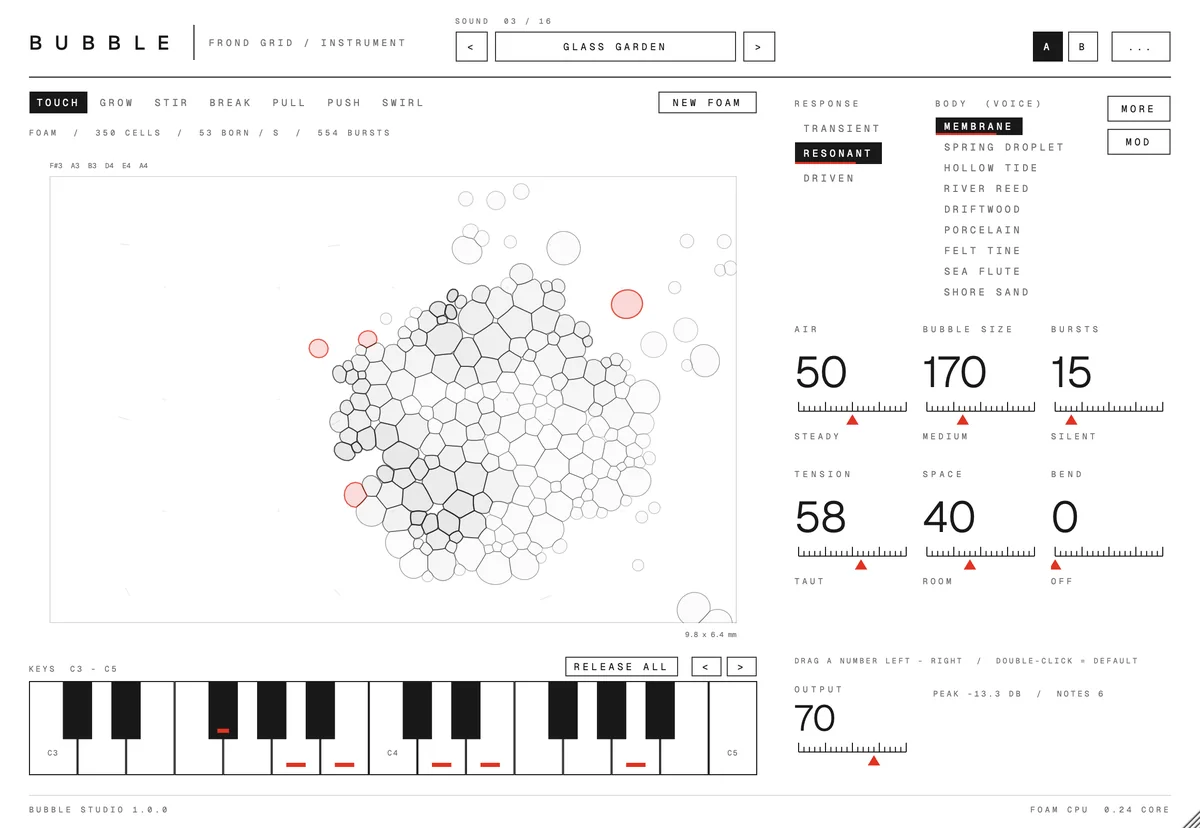
Bubble Studio runs a small raft of foam on screen. Bubbles are born, press against each other, stretch their films and burst, and each of those events plays a tone. Your notes act on the foam: soft notes sway it, held notes stretch the cells under them, strong notes grow more and larger bubbles. Pick one of sixteen starting points, choose how the membranes respond and which of nine bodies they sound through, and drag six big numbers. MOD makes things move by themselves, down to the body: a reed that slowly turns to porcelain. Touch, stir, pull or break the bubbles with the pointer while you play. Bubble Studio FX puts the same foam on an audio track, where the incoming audio excites it.
On saleDemo video coming soon.
What it does
The parts that make BUBBLE STUDIO different, in plain words.
Foam that plays itself
A physical foam simulation, not a sample player. Births, contacts, stretched films and bursts each become sound, so the same chord never plays quite the same way twice.
Nine bodies, and the space between them
Membrane, the original sound, and eight natural bodies: Spring Droplet, Hollow Tide, River Reed, Driftwood, Porcelain, Felt Tine, Sea Flute and Shore Sand. Pick a second body and blend the two, or let MOD sway, cycle or wander between them. Each bubble keeps the body it was struck with. The bodies are synthesised tones that suggest those materials, not recordings.
Hands on the bubbles
Touch, Grow, Stir, Break, Pull, Push and Swirl act directly on the bubbles under the pointer. New foam starts a fresh raft.
MOD that moves the foam
One row per thing that can move: air, waves, film, tension, bend, push / pull, swirl, touch, voice tone, space, echo, cutoff and chorus, plus the body itself. Give a row a shape, a rate and a depth, or press New mod for a fresh set. Aim it at push / pull, swirl or touch and the raft moves and plays with your hands off the screen. Space, echo, filter, chorus, phaser, tremolo and auto-pan are built in.
An effect for audio, too
Bubble Studio FX listens to an audio track: louder moments excite the foam more, and Input / Wet sets the balance between your audio and the foam.
Exports match playback
When your DAW bounces or freezes offline, the foam moves in step with the rendered audio, so an export is as lively as what you heard.
How it works
- You bring
Your notes, or audio on a track
- It does
A foam that grows, stretches and bursts
- You get
Sound that keeps moving
Screens
Click a screen to see it full size.
Details
- Price
- $39
- Release date
- October 23, 2026
- Systems
- macOS 12+ (Apple silicon) · Windows 10 / 11 (64-bit): VST3 and standalone app (BUBBLE STUDIO FX: VST3)
One purchase covers both Mac and Windows. - Formats
- Audio Unit · VST3 · standalone app
BUBBLE STUDIO FX: Audio Unit · VST3 - Status
- On sale
Questions
Which formats?
VST3 and Audio Unit plug-ins (an instrument and an audio effect), plus a standalone app. Windows: VST3 and the app.
Which systems?
macOS 12 or later on an Apple silicon Mac, and 64-bit Windows 10 or 11. No internet connection or account is needed.
How heavy is it?
Each instance runs its own foam simulation, which uses most of one processor core on its own. Use a few instances and freeze tracks you are not changing.
Are the bubbles saved with my project?
Every setting is saved with your project. The bubbles themselves are a live simulation, so a reopened project starts with a fresh raft and plays a little differently.
Can I play it from the computer keyboard?
Yes. Switch on PC keys in the "..." menu at the top right and play with A W S E D F and the keys around them; Z and X change the octave. In a DAW it stays off until you switch it on, so your DAW shortcuts keep working.
Is the manual in Japanese too?
Yes, the manual comes in English and Japanese. The plug-in's screen is in English.
 CUT
 MOSAIC
 SPRIG
 WEFT
 ODD PARTS
 SIX MATERIALS
 FIELD
 RELAY
 COLONY