 frond grid
 Circuit instrument
ODD PARTS
Build a small electronic circuit and play it. Change a part or a wire and the sound changes while it plays.
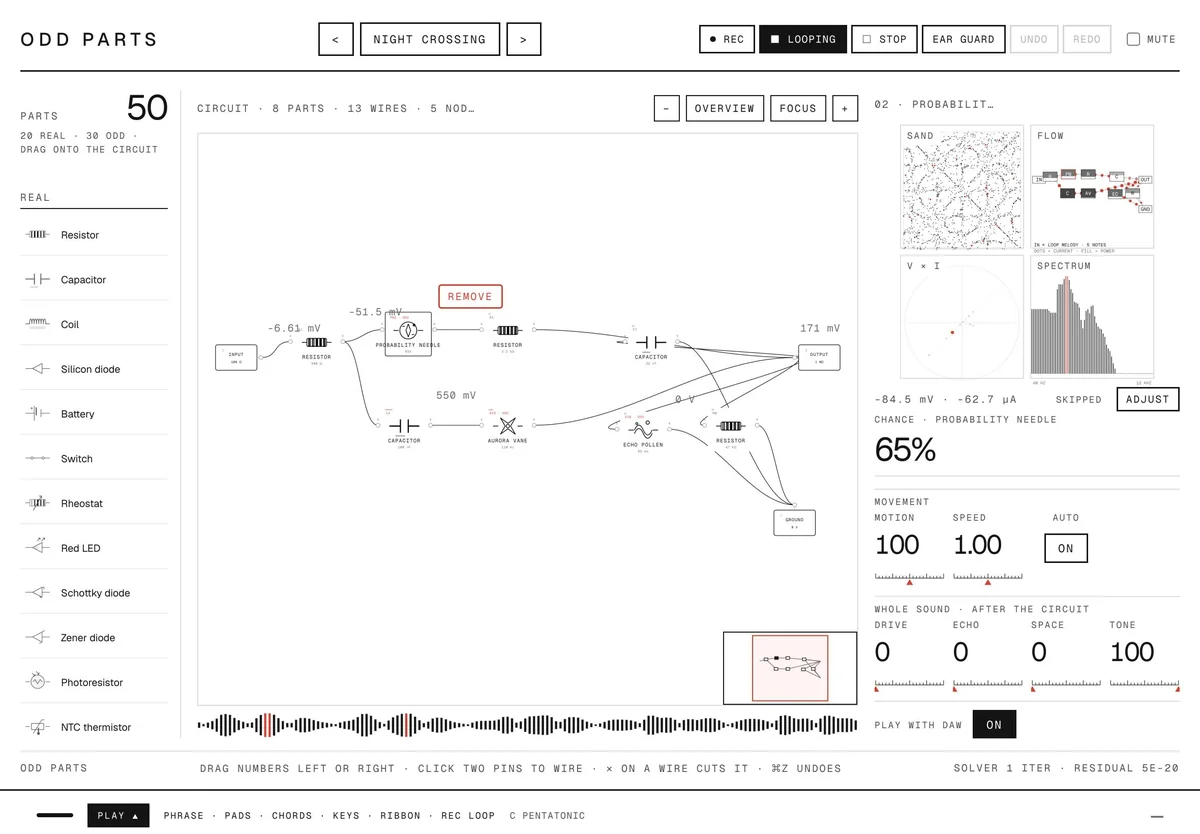
Odd Parts is a playable circuit. A source drives resistors, capacitors, coils, diodes, motors, speakers and lamps, plus thirty invented parts that remember, fold, echo, count and drift. The whole circuit is calculated as it plays, so swapping a part, moving a value or adding a wire changes the sound at once. Every circuit starts from an ambient or noisy phrase you can reshape, play it from pads, chords, keys or a MIDI keyboard, record what it plays and drag the take straight into your DAW. Odd Parts FX, included, runs your own tracks through the same circuit.
On saleDemo video coming soon.
What it does
The parts that make ODD PARTS different, in plain words.
Real parts and odd parts
Twenty real components (from resistors and Zener diodes to a DC motor, a moving-coil speaker, a quartz resonator and a filament lamp) and thirty invented ones, such as a needle that lets current through by chance, a foil that plays the line back reversed, or a pollen that returns voltage later.
See the sound as it plays
Four pictures at once: sand on a plate the sound shakes, the signature of the part you touch (its voltage against its current), the spectrum and the waveform over time. A resistor draws a line, a capacitor a loop, an odd part a figure of its own.
Phrases you shape
The loop that drives each circuit is written from a few settings: DRONE, SWELL, GRAINS, SPARSE, PULSE or the original MELODY, then density, pitch, spread and length up to 16 seconds. Draw tones and place clicks on the timeline. AUTO off stops everything that plays or moves by itself.
Parts that move on their own
Any part with a value can move: rate, depth, variation, phase, six shapes and a seed that repeats the same movement. MOTION and SPEED scale every movement at once, and your DAW can automate both.
Play it, and keep your ears
Pads, twelve chords, two rows of keys and a ribbon, all locked to a key and scale, so nothing sounds wrong. REC LOOP turns what you play into the circuit's loop. A MIDI note drives the circuit at its pitch with no added latency, and the loop can start and stop with your DAW. Ear guard is on from the start and keeps sudden loud switches and piercing highs at a safe level.
Your tracks through the circuit
Odd Parts FX puts the circuit on an audio track. The track takes the place of the circuit's own wave, so changing a part bends, tears or sets the track swinging in a different way. INPUT sets how hard the track drives the circuit.
119 circuits to start from
Grouped by what they do: pitch, rhythm, memory, resonance, real edges, real filters, real chimes and more. They also appear in your DAW's preset list. Drive, Echo, Space and Tone sit after the circuit.
Record and drag to your DAW
REC captures what Odd Parts plays; drag the take from the bar at the bottom of the window onto a track. With Play with DAW on, the loop follows your DAW's tempo and beat grid.
How it works
- You bring
A circuit, or one of 119 to start from
- It does
Calculates every part as it plays
- You get
A sound you play, or your track reshaped
Screens
Click a screen to see it full size.
Details
- Price
- Launch price $35 (until November 7, 2026 (JST), then $39)
- Release date
- October 24, 2026
- Systems
- macOS 11+ (Apple silicon, Intel) · Windows 10 / 11 (64-bit): VST3 and standalone app (ODD PARTS FX: VST3)
One purchase covers both Mac and Windows. - Formats
- Audio Unit · VST3 · standalone app
ODD PARTS FX: Audio Unit · VST3 - Status
- On sale
Questions
Is this a simulator for real electronics?
No. The circuit is a simplified model made for sound. Real parts follow their textbook laws; the odd parts are invented and labelled as fictional in the app.
Which formats does it come in?
On macOS: VST3, Audio Unit and a standalone app, plus Odd Parts FX as VST3 and Audio Unit. On Windows 10 and 11 (64-bit): VST3 and a standalone app, plus Odd Parts FX as VST3. Windows needs the Microsoft Edge WebView2 Runtime, already in Windows 11 and most Windows 10 PCs.
Does it play chords?
It plays one note at a time. CHORDS plays a chord's notes in turn at the tempo, or strums them as you slide. From a MIDI keyboard the newest key wins; velocity is not used.
Can I keep my own sounds?
Yes. SAVE keeps the circuit, every value and the loop as one of MY SOUNDS, at the top of the circuit list. They are files, shared by the plug-ins and the app.
Which sample rates work?
Any rate from 22.05 kHz to 192 kHz, with any buffer size.
 CUT
 MOSAIC
 SPRIG
 WEFT
 BUBBLE STUDIO
 SIX MATERIALS
 FIELD
 RELAY
 COLONY