 frond grid
 Standalone generator
FIELD
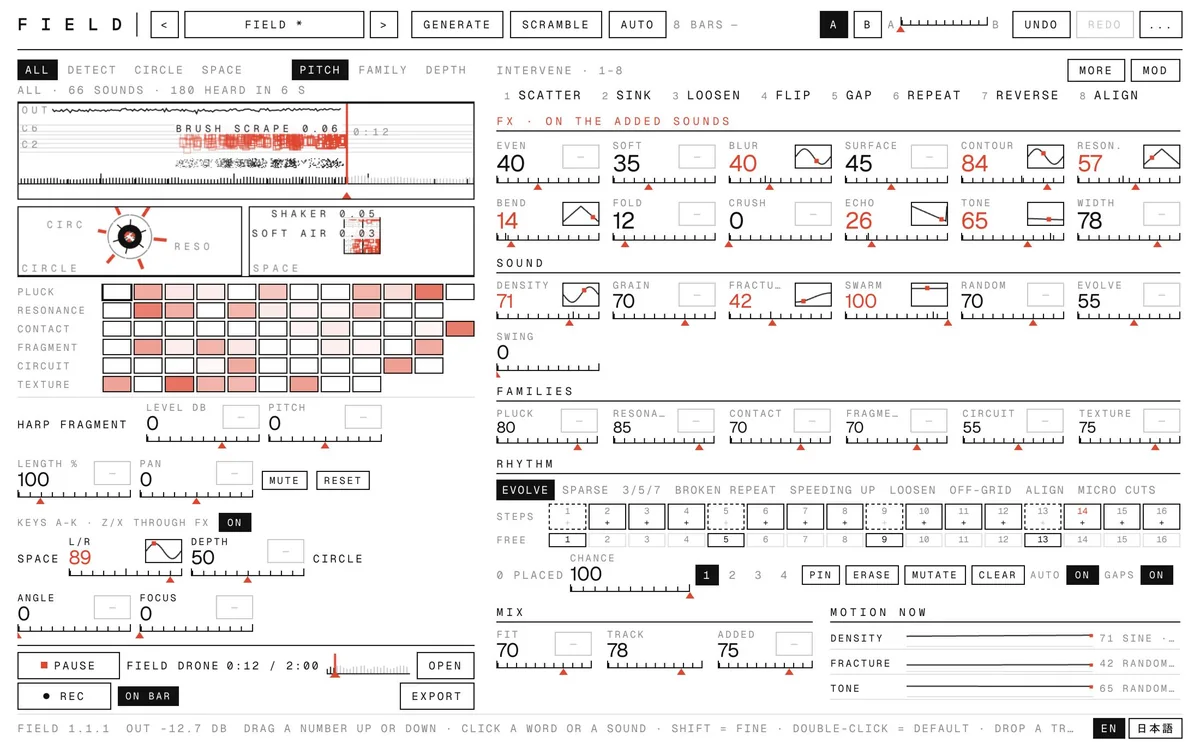
66 short sounds fired at random into the gaps of your track. Watch every one land, steer them by hand, or let them move by themselves.
Open a track, or start from the built-in ambient drone, and press Play. FIELD looks ahead in the music and drops short plucked, ringing, struck, broken, electronic and textured sounds into the spaces between notes, in the key you set. Each sound appears on screen where it lands, with its name. Turn SWARM up and a few become a thousand. Every control can move by itself: give it a shape and a speed, or press GENERATE for a whole new scene. FIT keeps the added sounds sitting under your music instead of on top of it. Press a sound to play it yourself, in key. Record up to 10 minutes, with the added sounds also saved on their own, and drag the WAV into your DAW.
On saleDemo video coming soon.
What it does
The parts that make FIELD different, in plain words.
See every sound
Three views: DETECT names each sound where it lands on your track, CIRCLE draws the 66 sounds as a ring of ticks, SPACE shows where they sit left to right and near to far. A grid of all 66 lights up as they play.
Everything can move
Each control has its own motion: sine, triangle, ramp, square, random steps or random drift, from 1/16 to 8 bars. GENERATE builds a complete scene in one of five characters; SCRAMBLE throws everything up in the air. Undo, A/B and a MORPH between them.
From a few notes to a swarm
DENSITY, GRAIN and FRACTURE set how many, how fine and how broken. SWARM adds up to nine more layers of the same idea, for dense clouds of sound.
Sits in your music
FIT evens out the 66 sounds, follows your track's loudness and brightness, and ducks under its hits. EVEN, SOFT and BLUR smooth, soften and blur the added sounds; the track itself is never processed.
Play it, then take it with you
Press any sound to play it in key; A to K play the scale. Edit each sound's level, pitch, length and pan. Record up to 10 minutes, starting and stopping on the bar; export the full mix, the added sounds on their own, or both, and drag the WAV straight onto a DAW track.
How it works
- You bring
Your track, or the built-in drone
- It does
66 sounds placed in its gaps, moving on their own
- You get
A recording you drag into your DAW
Screens
Click a screen to see it full size.
Details
- Price
- Launch price $35 (until November 7, 2026 (JST), then $39)
- Release date
- October 24, 2026
- Systems
- macOS 13+ (Apple silicon) · Windows 10 (1903+) / 11 (64-bit): standalone app (needs Microsoft Edge WebView2)
One purchase covers both Mac and Windows. - Formats
- standalone app
- Status
- On sale
Questions
Is it a plug-in?
No. FIELD is a standalone app: it plays your track itself so it can look ahead for the gaps. Record the result and drag the WAV into your project.
Which files can I open?
WAV, AIFF, MP3, M4A and FLAC, up to 10 minutes. Set the track's tempo and key so the added sounds fall on its beat and in its key.
How long can a recording be?
Up to 10 minutes per take. Each take is saved as the full mix and as the added sounds alone, sample-aligned, so you can layer them over your own track in the DAW.
Which systems?
macOS 13 or later on an Apple silicon Mac. No internet connection or account is needed. Windows: 64-bit Windows 10 (1903 or later) or 11, standalone app (needs Microsoft Edge WebView2, already on Windows 11 and most Windows 10 PCs). One purchase covers both.
Is the manual in Japanese too?
Yes, the manual comes in English and Japanese.
 CUT
 MOSAIC
 SPRIG
 WEFT
 BUBBLE STUDIO
 ODD PARTS
 SIX MATERIALS
 RELAY
 COLONY