 frond grid
Frond CUT 1.0.0 — Manual
English version. 日本語
1. What CUT does
CUT slices a loop at its attacks, beat by beat, and plays the slices back in a new order, in your DAW's tempo.
Nothing is time-stretched: every slice plays from its own start.
It comes in two forms: Frond CUT plays a loop you load; Frond CUT FX records what comes into its track and rearranges it on the spot.
2. The first five minutes
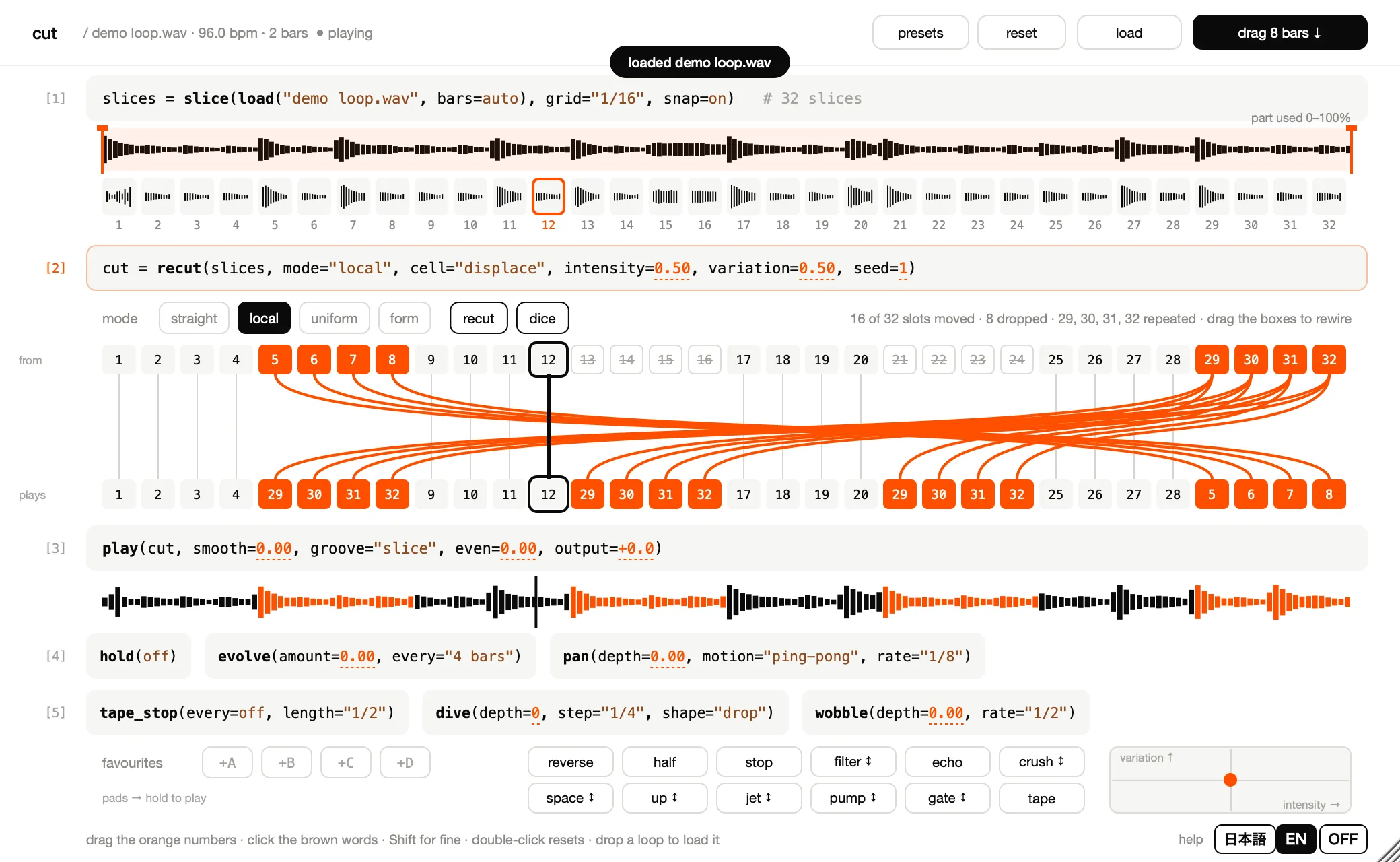
- Put Frond CUT on an instrument track. It needs no MIDI notes.
- Logic Pro (Mac): a Software Instrument track, then AU Instruments › Frond Grid › Frond CUT.
- Ableton Live: a MIDI track, then Plug-Ins › VST3 › Frond Grid › Frond CUT (on a Mac, Audio Units works too).
- REAPER: Track › Insert virtual instrument on new track, then Frond CUT (Frond Grid) under VST3i.
- Press load (①), or drop a loop onto the window. WAV, AIFF, FLAC, Ogg Vorbis, MP3, M4A and CAF, up to 64 seconds.
- Start the DAW. The top line says playing (②), and CUT plays in the DAW's tempo, even if the loop was recorded at another tempo.
- Press dice (③). Mode, cell, intensity, variation, seed and pan change together; the lines in [2] show the new order from the next bar.
- Hold the stop pad (④) and drag to the right: the tape slows down more. Let go and it catches up with the beat.
CUT is made for 4/4. In other time signatures it still cuts in groups of four beats.
3. The window
The window reads like a notebook of code: each grey box is one group of settings (the code, ring around [2]).
- Drag an orange number (ring on
0.50) sideways, or up and down, to change it. - Click a brown word (ring on
"local") to switch it. - Hold Shift for fine steps; double-click a value to return it to its default.
- A changed value flashes and shows "before → after".
| Part | What it is | |
|---|---|---|
| ① | [1] File and slices | The loop and its slices. The orange span over the waveform is the part of the file used: drag its edges for start and end, drag inside to move it, double-click for the whole file. The slice playing now has an orange frame. |
| ② | [2] The cut | Lines from the slices (top row, from) to where they play (bottom row, plays): the order of the bar playing now. Orange = moved; struck through = not used this time ("8 dropped" in the line above). The small dots under the bottom row are pan positions. Small letters: N nearby · F anywhere · R repeat · C recall · V reverse · D drop. |
| ③ | [3] The sound playing | What CUT plays now, with the play position. |
| ④ | [4] Performance | hold, evolve and pan. |
| ⑤ | [5] Pitch play | tape_stop, dive and wobble (speed and pitch change together, like tape). |
| ⑥ | favourites | A–D: four kept states. |
| ⑦ | pads | Twelve pads that act while you hold them. |
| ⑧ | XY pad | intensity across, variation up. |
| ⑨ | load | Load a loop (or drop one onto the window). |
| ⑩ | drag 8 bars ↓ | Drag eight bars of the current sound onto a track. |
| ⑪ | presets · reset | Save or load settings; everything back to the defaults. |
| ⑫ | recut · dice | A new cut; change many settings at once. |
| ⑬ | help | Point at anything for a line of help at the bottom (a longer one appears next to it). help switches 日本語 / EN / OFF. It starts in English; the language you pick is used for the next CUT and CUT FX you add, and is saved with the project. |
Drag the window's bottom-right corner to resize it.
4. Controls
Changes take effect at the next bar line; pitch play and the XY pad act at once. grid, snap, bars and the file range prepare the loop again and swap it in.
The names are as they appear on the screen; where your DAW shows another name for the same parameter, it is given in brackets.
The cut — [1] and [2]
| Name | What it does | Default |
|---|---|---|
mode (buttons straight / local / uniform / form) | straight: as recorded · local: from nearby · uniform: from anywhere · form: remembers phrases and recalls them | local |
cell | displace: whole beats move · mutate: single slots | displace |
variation | How much is rearranged | 0.50 |
intensity | How strongly the rearranged places change | 0.50 |
seed | The number of the cut, 1–999: the same number gives the same cut every time | 1 |
grid (Division) | Slice size: 1/8, 1/16 or 1/32 | 1/16 |
snap (Slicing) | on: cut at the attacks · off: even slices | on |
bars (Loop Bars) | Bars in the loop: auto (worked out from the DAW's tempo), 1, 2, 4, 8 or 16 | auto |
Buttons: recut moves seed on by one (a new cut). dice changes mode, cell, intensity, variation, seed and pan at once.
The sound — [3]
| Name | What it does | Default |
|---|---|---|
smooth | Smoother joins (adds the slice's own tail); 0 cuts plainly | 0.00 |
groove | slice: each slice keeps its own feel · slot: the feel of the place it plays · off: on the grid | slice |
even | Evens out the slices' levels | 0.00 |
output | Output level, −24 to +12 dB | +0.0 |
Performance — [4]
| Name | What it does | Default |
|---|---|---|
hold | Repeats what plays now: loop = one loop, or 2 / 4 / 8 bars | off |
evolve amount | Every few bars, moves the cut settings a little with this probability (not while hold is on) | 0.00 |
evolve every | How often: 1, 2, 4, 8 or 16 bars | 4 bars |
pan depth | How far each slice moves left or right (a balance, so it never gets louder) | 0.00 |
pan motion | ping-pong · rotate · jump (random) · moved (only the slices the cut moved) | ping-pong |
pan rate | How fast the pan moves: 1/16 to 4 bars | 1/8 |
Pitch play — [5]
| Name | What it does | Default |
|---|---|---|
tape_stop every | At the end of a bar the tape slows to a stop: every bar, every 2, 4 or 8 bars | off |
tape_stop length | How long it takes to stop: 1/8 to 1 bar | 1/2 |
dive depth | Each step drops by this many semitones (0–24) | 0 |
dive step · shape | The step length (1/16 to 1 bar), and the shape: drop · scoop · mixed | 1/4 · drop |
wobble depth | Tape-like pitch wobble, up to ±60 cents | 0.00 |
wobble rate | The wobble's period: 1/4 to 4 bars | 1/2 |
Pads — they act while you hold them
| Pad | What it does | While holding, drag |
|---|---|---|
| reverse | Every beat plays the one before it, backwards | — |
| half | Half time (the pitch stays) | — |
| stop | The tape slows to a stop and catches up when you let go | right: slower |
| filter | Muffles the sound | down: more · up: opens into a thin high-pass |
| echo | Sends what plays while held into an echo (the echo rings on) | — |
| crush | Lo-fi | up: stronger |
| space | Sends into a large hall | — |
| up | Pitch up | down: +7, +5, −5, −7, −12 |
| jet | A jet-like sweep | — |
| pump | The level ducks on every beat (while the DAW plays) | — |
| gate | Chops the sound into blips | up: finer · down: coarser |
| tape | The tape stops; let go and it is back in place at once | — |
- Right-click a pad to choose: while held / latch (click on, click off), how it moves by itself (none / wave / random) and its speed. For up, right-click switches STEPS (set intervals) and FREE (drag, ±24 semitones).
- Pad settings are saved with the project. A pressed pad is not: presets and projects never start with a pad on (a latched pad is off when the project is opened again).
Favourites, XY pad, cutting by hand
- favourites A–D: click an empty slot (+A) to keep the current state there; click a kept one to recall it. A slot is red only while the sound is exactly that favourite. Right-click for recall / overwrite / forget. Pads are not part of favourites.
- XY pad: intensity across, variation up, both at once; heard from the next beat while you drag.
- Cutting by hand: drag the boxes in [2]. A top box onto a bottom box = that slice plays there; a bottom box onto a top one = rewire; two bottom boxes = swap. Option-click (Alt-click on Windows) or right-click returns a box to the plan; clear returns all. Hand cuts are saved with the project and in favourites (changing
gridstarts again).
Presets and reset
- presets: save the current settings to a file, or load one (in Music › Frond › Presets › CUT). The loop and the favourites stay as they are.
- reset: everything back to the defaults. Undo brings it back during the next 8 seconds.
Frond CUT FX (the effect)
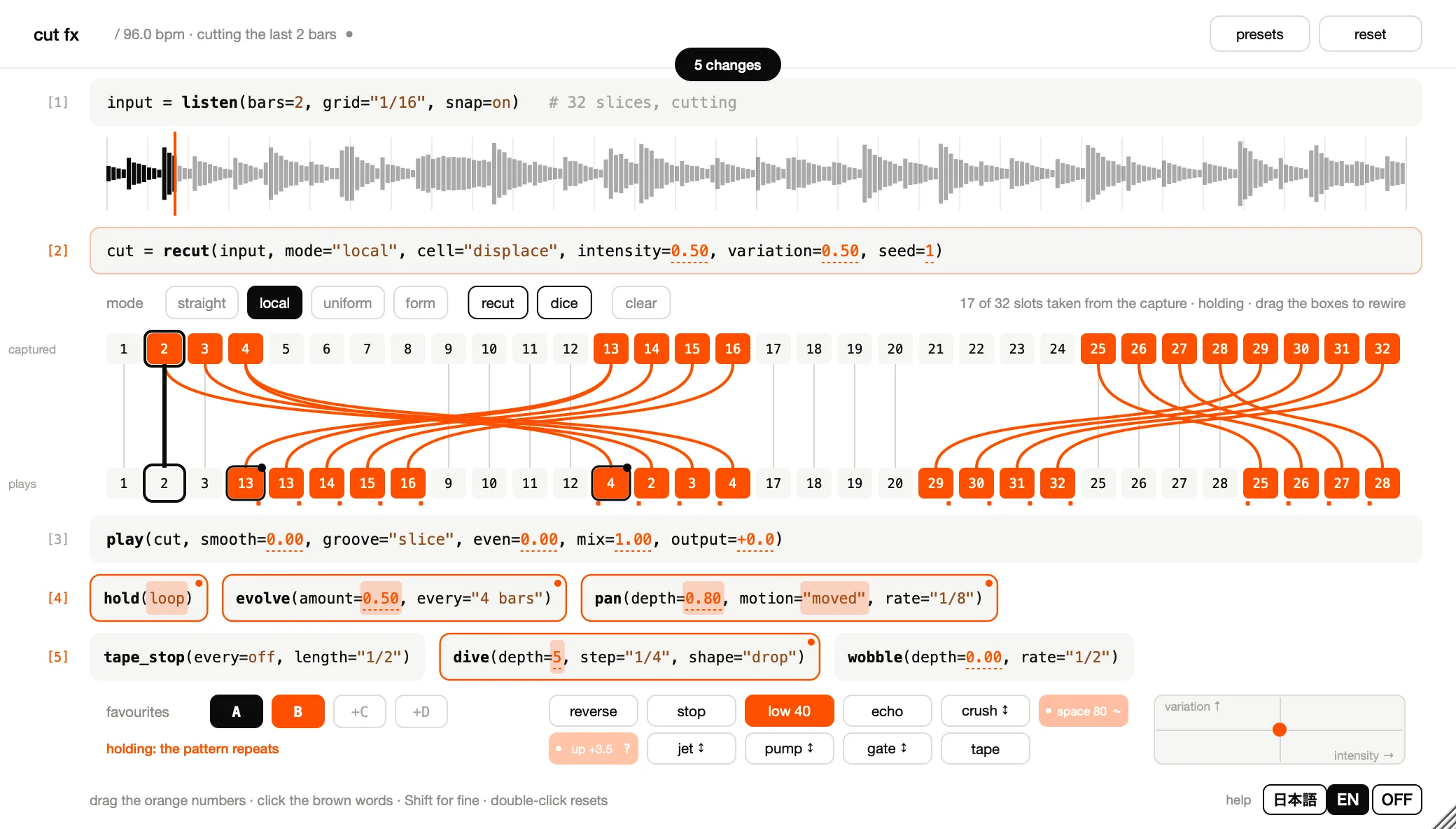
- Put Frond CUT FX on an audio track (a drum track, say) as an audio effect: Plug-Ins › Frond Grid › Frond CUT FX.
- When the DAW plays, the first bars pass through unchanged while CUT FX records them (①,
listen(bars=2)by default). Then the cut begins: the top line says "cutting the last 2 bars". - Beats that are not rearranged are the incoming sound itself; rearranged beats come from other beats of the recorded bars (② shows captured → plays).
| Name | What it does | Default |
|---|---|---|
listen bars (Capture Bars) | Bars recorded: 1, 2 or 4 | 2 |
mix (③) | How much of the cut you hear | 1.00 |
Everything else (the code, pads, favourites, XY pad, cutting by hand) works as in Frond CUT. CUT FX has no half pad, no file range and no drag 8 bars ↓, and groove is slice or slot.
Latency is 64 samples (about 1.3 ms at 48 kHz), reported to the DAW so it is compensated. straight gives back the input bit for bit.
While the DAW is stopped, below 50 BPM, and for the recorded bars after a tempo change, the input passes through unchanged.
5. Taking it into your DAW
- drag 8 bars ↓: drag it onto an audio track (in Ableton Live, an audio track or one of its clip slots). Eight bars of the current sound arrive as a WAV, the same as playing from bar 1 in the DAW's tempo, with
output.
The WAV is kept in Music › Frond Grid › CUT drags, so the DAW project keeps its audio. CUT never deletes these files; remove the ones you no longer use.
- Saving: the loop's audio itself is saved in the project (the original file, up to 40 MB). Move or delete the file and the project still opens with the same sound.
- Exporting: a bounce sounds like playback. Echo and space tails, and the pads' own movement, can differ slightly from one playback or export to the next; that is how these performance effects work.
- The standalone app has no DAW tempo, so it plays at the loop's own tempo. Choose the audio output under Options (top left).
6. If something goes wrong
| What happens | What to do |
|---|---|
| CUT is not in the DAW's list | Restart the DAW or rescan plug-ins; if it is still missing, restart the computer. |
| A loop does not load | Files over 64 seconds, damaged or too short files are refused (the window says why); the previous loop stays. |
| No sound | Is the DAW playing? Frond CUT plays with the DAW. In the standalone app, choose the output under Options (top left). |
| CUT FX does not cut | While it records the first bars, the input passes through; keep playing. |
| drag 8 bars ↓ does not land | Drop it on an audio track (not a MIDI or instrument track). |
| The window is too large for the screen | Drag the bottom-right corner to make it smaller. If part of it is off the screen, move the window by its title bar. |
| The help line is in the wrong language | Click help at the bottom right: 日本語 / EN / OFF. |
| CUT FX plays out of time with the project | CUT FX cuts on your project's beats and never stretches the sound, so the audio on its track must already play in the project's tempo. Set the project tempo to the loop's tempo, or fit the clip to the project tempo in your DAW (Ableton Live: Warp on in Clip View; Logic Pro: Flex & Follow, or the Flex checkbox, in the Region inspector; REAPER: playback rate in Item Properties with "Preserve pitch when changing rate" on). Frond CUT does not need this: it places each slice on your project's beats; if it counts the loop's bars wrongly, set bars to the loop's real length. |
7. Where files go, and removing CUT
CUT keeps: your presets (Music › Frond › Presets › CUT and CUT FX), the drag 8 bars ↓ audio (Music › Frond Grid › CUT drags), the help language you picked, and the standalone app's settings (including its last loop). Removing CUT does not delete them.
The exact places, and how to remove CUT on Mac and Windows: https://frondgrid.com/support/
8. System requirements
- Mac: macOS 12 or later, Apple silicon or Intel. A DAW that hosts Audio Units or VST3 (checked with Logic Pro and Ableton Live), or the standalone app.
Frond CUT: Audio Unit, VST3 and a standalone app. Frond CUT FX: Audio Unit and VST3.
- Windows: Windows 10 or 11, 64-bit. Frond CUT: VST3 and a standalone app. Frond CUT FX: VST3. One purchase covers both Mac and Windows.
- Loops: WAV, AIFF, FLAC, Ogg Vorbis, MP3, M4A and CAF, up to 64 seconds.
9. Licence, refunds, contact and privacy
- Licence: use of CUT is governed by the Frond Grid End User License Agreement (https://frondgrid.com/legal/eula/; the installer shows it too). You may install it on up to three computers that you own or control. Music and sounds you make with CUT are yours to use in any way.
- Refunds: they follow the Frond Grid Refund Policy (https://frondgrid.com/legal/refund/). As a downloadable product, CUT is not refunded for a change of mind. Within 14 days of purchase we refund when it does not run on a computer that meets the requirements and we cannot fix it, when you were charged twice, when you cannot download it, or when it is clearly not as described. Lemon Squeezy handles the refund.
- Contact: Frond Grid, e-mail moonwork740 [at] gmail [dot] com. For a refund, please include your order number (in the Lemon Squeezy receipt e-mail) and the e-mail address you bought with.
- Privacy: CUT does not connect to the internet, collects no data and has no online licence check.
VST is a registered trademark of Steinberg Media Technologies GmbH. Audio Units is a trademark of Apple Inc.