 frond grid
Frond WEFT 1.0.1 — Manual
English version. 日本語
1. What WEFT is
WEFT is a synth whose tone keeps moving while you hold a note.
It re-reads fragments of its own sound. WEAVE weaves the phrase you just played into the note you hold, in the order you played it.
MOD lets the settings move on their own. DRAG 8 BARS takes the last 8 bars you played to your DAW as a 24-bit WAV.
2. Your first five minutes
- Open WEFT.
- Logic Pro: make a Software Instrument track, then choose AU Instruments > Frond Grid > Frond WEFT.
- Ableton Live: Plug-Ins > VST3 > Frond Grid > Frond WEFT.
- You can also use the standalone app, Frond WEFT, in Applications.
- Pick the preset Woven Lines. Click the preset name at the top (10) and choose it from the list, or step with < and >.
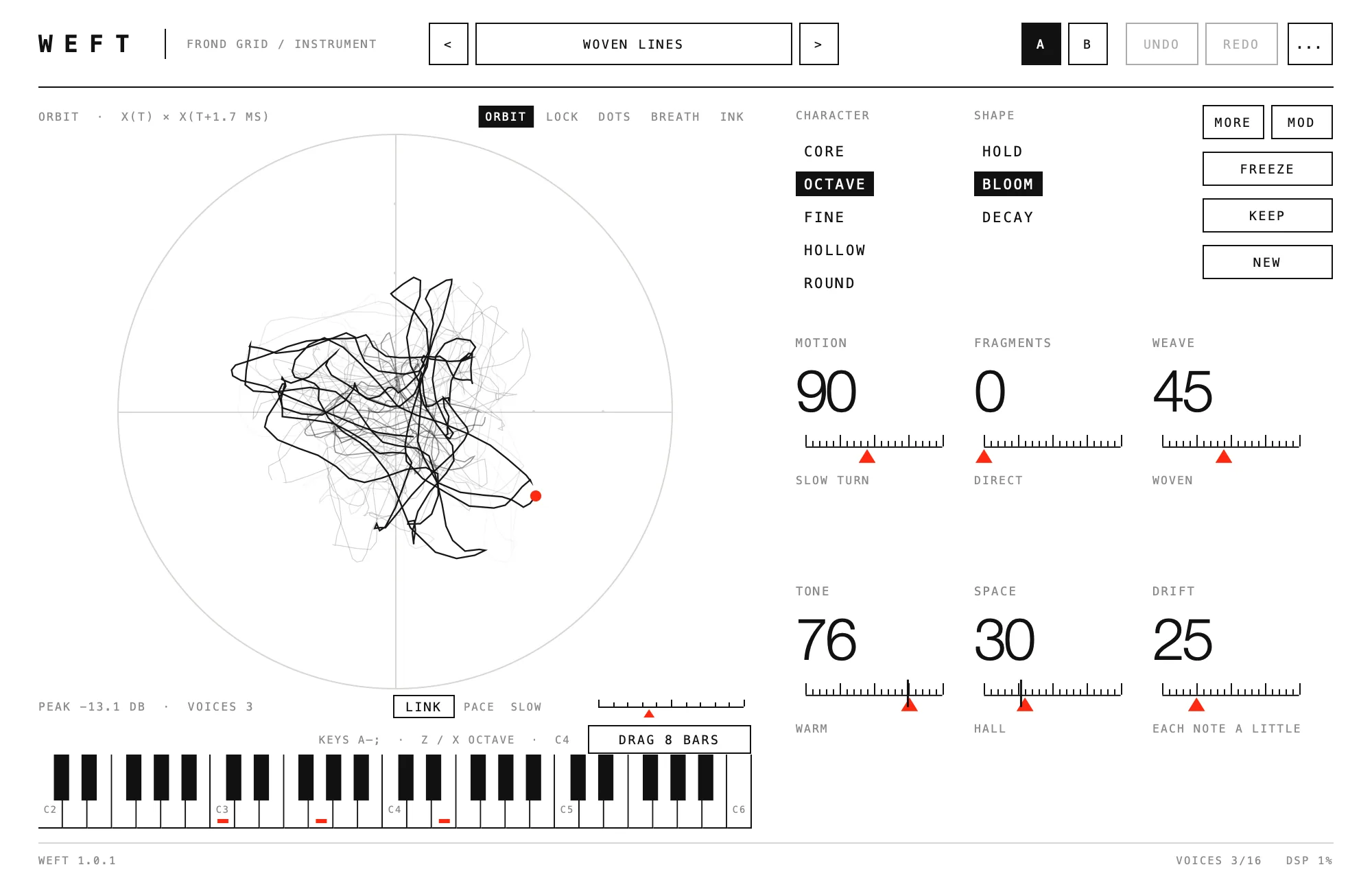
- Hold a chord. The circle (1) draws the sound you are hearing, and the tone keeps moving while you hold.
- Play a short phrase, then hold one note. The phrase comes back inside the held note, in the order you played it (WEAVE).
- Drag DRAG 8 BARS (4) onto an audio track. The last 8 bars you played arrive as a WAV. In Ableton, drop it on an audio track or an empty area: on a MIDI track, Ableton turns the audio into MIDI notes.
Computer keys play too: A W S E D F T G Y H U J K O L P ; (Z / X change the octave). In a DAW, click WEFT once first.
3. The screen
| No. | Name | What it does |
|---|---|---|
| 1 | ORBIT | A picture of the sound you are hearing. Grab the line and pull: the sound bends (left/right brightness, up/down depth of motion) and springs back when you let go. |
| 2 | View (ORBIT, LOCK, DOTS, BREATH, INK) | Five ways to draw the picture. Display only. |
| 3 | PACE and LINK | PACE sets how fast the picture moves. With LINK on, PACE also sets how fast the sound moves, from half to double speed. |
| 4 | Keyboard and DRAG 8 BARS | Click the keys to play. DRAG 8 BARS (drag the last 8 bars) takes what you played to a track. |
| 5 | CHARACTER and SHAPE | CHARACTER (the tone): CORE, OCTAVE, FINE, HOLLOW, ROUND. SHAPE (how the level moves): HOLD, BLOOM, DECAY. |
| 6 | FREEZE, KEEP, NEW | FREEZE holds the texture in place. KEEP keeps released notes sounding. NEW makes a fresh sound. |
| 7 | Big numbers | MOTION, FRAGMENTS, WEAVE, TONE, SPACE, DRIFT. |
| 8 | MORE | 12 more settings. Press again to go back. |
| 9 | MOD | The settings that move on their own. Press again to go back. |
| 10 | Presets and the top bar | < > and the preset name (39 presets, and Save preset), A / B to compare two settings, UNDO / REDO, and ... for window size and colours. |
4. Controls
Big numbers (7)
| Name | What it does |
|---|---|
| MOTION | How far the tone moves while you hold a note. |
| FRAGMENTS | 0 is the direct sound; higher re-reads more fragments of it. |
| WEAVE | Weaves the phrase you just played (your last 8 notes) into the held note, in the order you played it, on consonant intervals only. To hear it, play a short phrase, then hold a note. |
| TONE | Darker or brighter. |
| SPACE | Room. |
| DRIFT | Small differences from note to note. |
Using a big number:
| Do this | To |
|---|---|
| Drag left / right | Change the value. |
| Shift + drag | Change it more finely. |
| Click on the ruler | Jump there (keep dragging to follow the pointer). |
| Double-click | Go back to the default. |
| Scroll | Small steps (Shift for finer). |
A setting that MOD is moving shows where it is right now as a thin line on its ruler.
MORE (8)
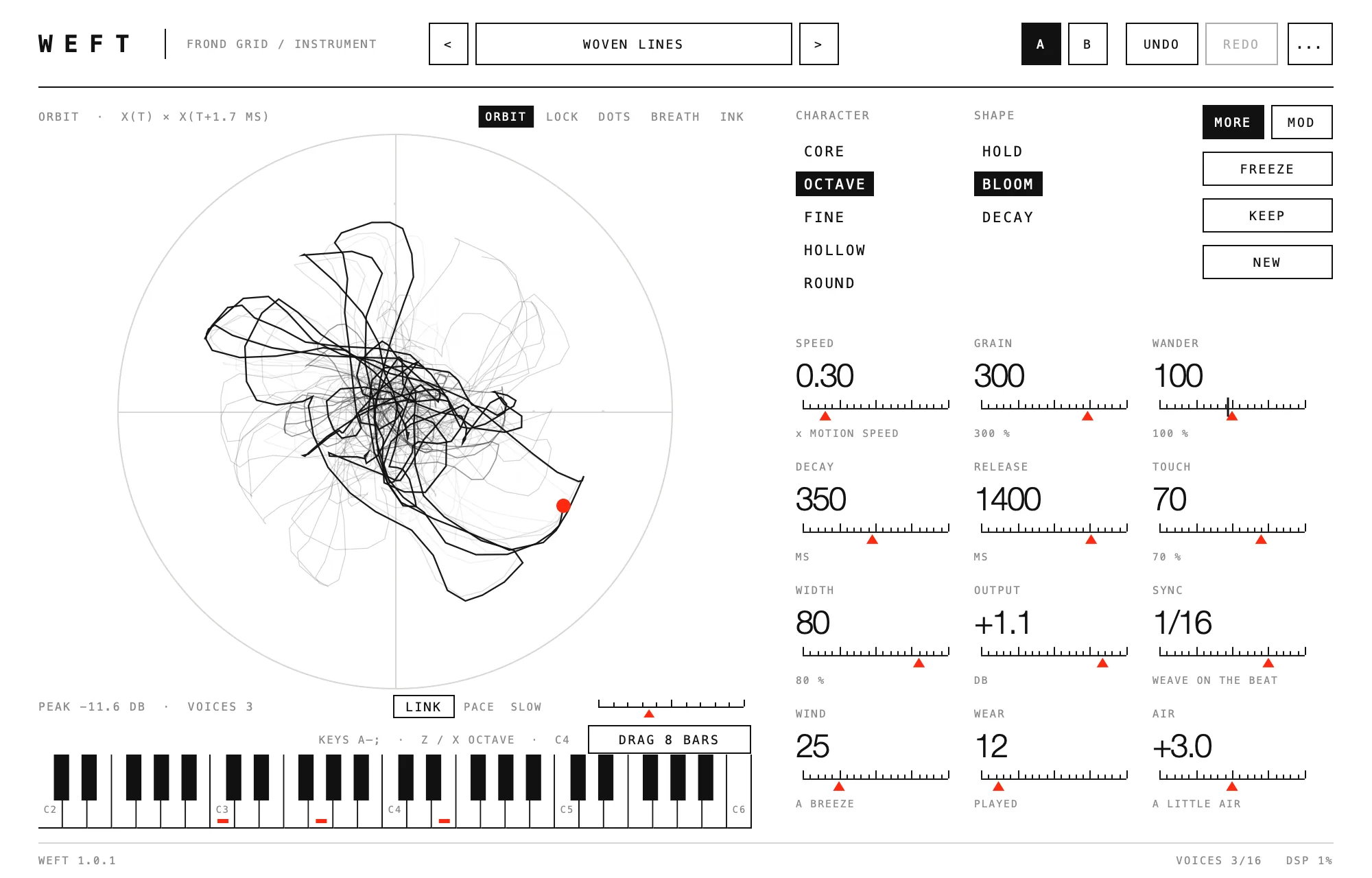
| Name | What it does |
|---|---|
| SPEED | How fast the tone moves. |
| GRAIN | Fragment length. |
| WANDER | How far the read position strays. |
| DECAY | Length of the fade when SHAPE is DECAY. |
| RELEASE | How long a note sounds after you let go. |
| TOUCH | How much velocity changes level and brightness. |
| WIDTH | Stereo width. |
| OUTPUT | Output level. |
| SYNC | WEAVE on the DAW tempo: FREE, 1/4, 1/8, 1/16, 1/8T. |
| WIND | Tone and weave drift on their own, slowly. |
| WEAR | Tape wobble, soft saturation, dulled highs. |
| AIR | A gentle lift in the highs, so WEFT carries on small speakers too. 0 is the original tone. |
Buttons (6, 8, 9)
| Button | What it does |
|---|---|
| FREEZE | Stops the fragment position and repeats the texture in place. |
| KEEP | Released notes go on sounding (latch). Press again to let them go. |
| NEW | A fresh sound inside a gentle range. UNDO brings the last one back. |
| MORE | Opens the 12 more settings. |
| MOD | Opens the modulators. |
CHARACTER and SHAPE (5)
- CHARACTER: CORE, OCTAVE, FINE, HOLLOW, ROUND (a clean tone for bass).
- SHAPE: HOLD, BLOOM (a slow rise), DECAY (fades).
- Two characters at once: Shift-click a second name in the CHARACTER list. It is shown as an outline (B). The amount of B is the depth of the CHARACTER row in MOD. Shift-click B again to go back to one character. Red lines under the two names show how much of each is sounding now.
ORBIT, views, PACE and LINK (1, 2, 3)
| View | What it draws |
|---|---|
| ORBIT | The line itself, the basic view. |
| LOCK | Drawn in step with the lowest pitch, so a held note almost stands still. |
| DOTS | Fine grains instead of a line. |
| BREATH | The figure turns slowly and breathes with the level. |
| INK | Thin where the line moves fast, thick where it lingers, like a brush. |
- PACE: drag the red triangle right for faster, left for slower. Double-click goes back to SLOW. On its own, PACE changes only the picture.
- LINK: with LINK on, PACE also sets how fast the sound moves, from half to double speed. Turn it off for the usual speeds.
MOD: settings that move on their own (9)
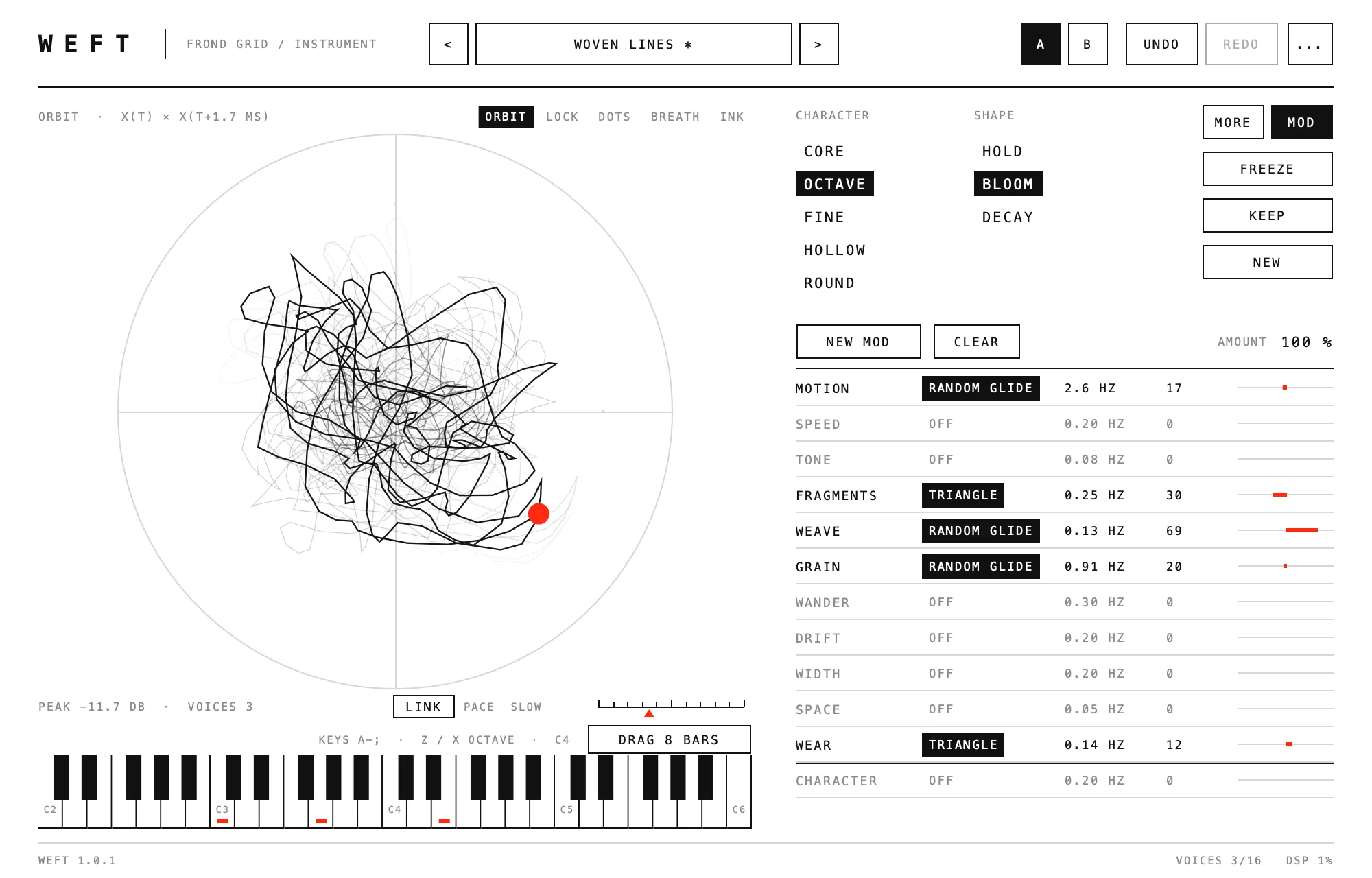
| No. | Name | What it does |
|---|---|---|
| 1 | Name | The 11 settings that can move: MOTION, SPEED, TONE, FRAGMENTS, WEAVE, GRAIN, WANDER, DRIFT, WIDTH, SPACE, WEAR. |
| 2 | Shape | Click to step: OFF, SINE, TRIANGLE, RANDOM STEP, RANDOM GLIDE. |
| 3 | Rate | How fast it moves. Drag left / right (Shift for finer); double-click for the default. |
| 4 | Depth | How far it moves. Drag left / right; double-click for 0. |
| 5 | Movement now | Where it is right now (red). |
| 6 | NEW MOD | A new random set of modulators. The sound's own settings are untouched. UNDO brings the previous set back. |
| 7 | CLEAR | Stops every modulator. |
| 8 | AMOUNT | Scales all modulators at once. |
| 9 | CHARACTER row | Moves the character itself: OFF, BLEND, SINE, CYCLE, RANDOM STEP, RANDOM GLIDE. |
Every setting stays inside its own range, and its changes are smoothed so they never click.
Keys and shortcuts
| Keys | What they do |
|---|---|
| A W S E D F T G Y H U J K O L P ; | Play from the computer keyboard (W E T Y U O P are the black keys). |
| Z / X | Octave down / up. |
| Cmd+Z / Shift+Cmd+Z (Windows: Ctrl+Z / Shift+Ctrl+Z) | Undo / redo. |
| Shift + drag | Finer big numbers, MOD rate and depth. |
| Shift + click | Pick or remove the second character (B). |
| Double-click | Default value (big numbers, MOD, PACE). |
MIDI: the mod wheel adds MOTION, channel pressure adds TONE. Pitch bend and the sustain pedal work.
5. Taking it into your DAW
- DRAG 8 BARS: press and drag onto a track or the desktop. The last 8 bars you played (at the DAW's tempo and time signature) arrive as a 24-bit WAV.
- If you played less than 8 bars, you get what you played.
- The same file is kept in Music > Frond Grid > weft takes.
- With nothing played yet, the button says PLAY FIRST. If 8 bars would be too long, it says 40S LIMIT.
- In a project: WEFT's settings are saved inside your DAW project and come back when you open it.
- Your own presets: click the preset name and choose Save preset.
- Bouncing: a bounce sounds the same as what you heard. MOD and WIND follow the song position.
6. If something is not right
| What happens | What to do |
|---|---|
| KEEP (or another button) switched by itself when I pressed Return | After you click a WEFT button, Return clicks it again. Click the button again (or Cmd+Z; Ctrl+Z on Windows). Before pressing Return in your DAW (in Logic, Return goes to the start), click outside the WEFT window. This is fixed in 1.0.2. |
| DRAG 8 BARS became MIDI notes in Ableton | You dropped it on a MIDI track. Drop it on an audio track or an empty area. |
| The window goes off the screen | Move it by its title bar, or choose a smaller size with ... at the top right. Sizes that do not fit the screen are greyed out. |
| WEFT is not in the DAW's list | Restart the DAW or rescan plug-ins. If it is still missing, restart the Mac. |
| WEAVE cannot be heard | Raise WEAVE, play a short phrase, then hold one note. |
| Computer keys do not play | In a DAW, click WEFT once first. |
| DRAG 8 BARS says PLAY FIRST | Nothing has been played yet. Play, then press. |
| The standalone app's audio settings were reset | Its settings file was damaged, so the app opened with default settings. The old file is kept next to it with .damaged added to its name. |
7. Where files are, and uninstalling
Where WEFT puts its files, where your presets and recordings are, and how to uninstall, on Mac and on Windows: frondgrid.com/support/#uninstall-weft
8. Requirements
- Mac: macOS 12 or later, Apple silicon or Intel. Audio Unit, VST3 and a standalone app. Checked with Logic Pro and Ableton Live.
- Windows: 64-bit Windows 10 or 11 (x64). VST3 and a standalone app.
- One purchase covers both Mac and Windows.
9. Licence, refunds, contact, privacy
- Licence: Use of WEFT is governed by the Frond Grid End User License Agreement (shown by the installer; afterwards in /Library/Application Support/Frond Grid/WEFT/ as EULA_PLUGINS_EN.txt and EULA_PLUGINS_JA.txt, and at frondgrid.com/legal/eula/). Install it on up to three computers you own or control. Music and sound you make with it are yours, for any use.
- Refunds: Refunds follow the Frond Grid Refund Policy (frondgrid.com/legal/refund/). As WEFT is a download, there are no refunds for a change of mind. Within 14 days of purchase you get a refund if WEFT does not work on a computer that meets the requirements and we cannot fix it, if you were charged twice, if the download does not work, or if it is clearly not as described. Lemon Squeezy handles refunds.
- Contact: Frond Grid, e-mail: moonwork740 [at] gmail [dot] com. For a refund, please include your order number (in your Lemon Squeezy receipt) and the e-mail address you used to buy.
- Privacy: WEFT does not connect to the internet, collect data or check licences online.
VST is a registered trademark of Steinberg Media Technologies GmbH. Audio Units is a trademark of Apple Inc.