 frond grid
 Chord-progression instrument
FLOW
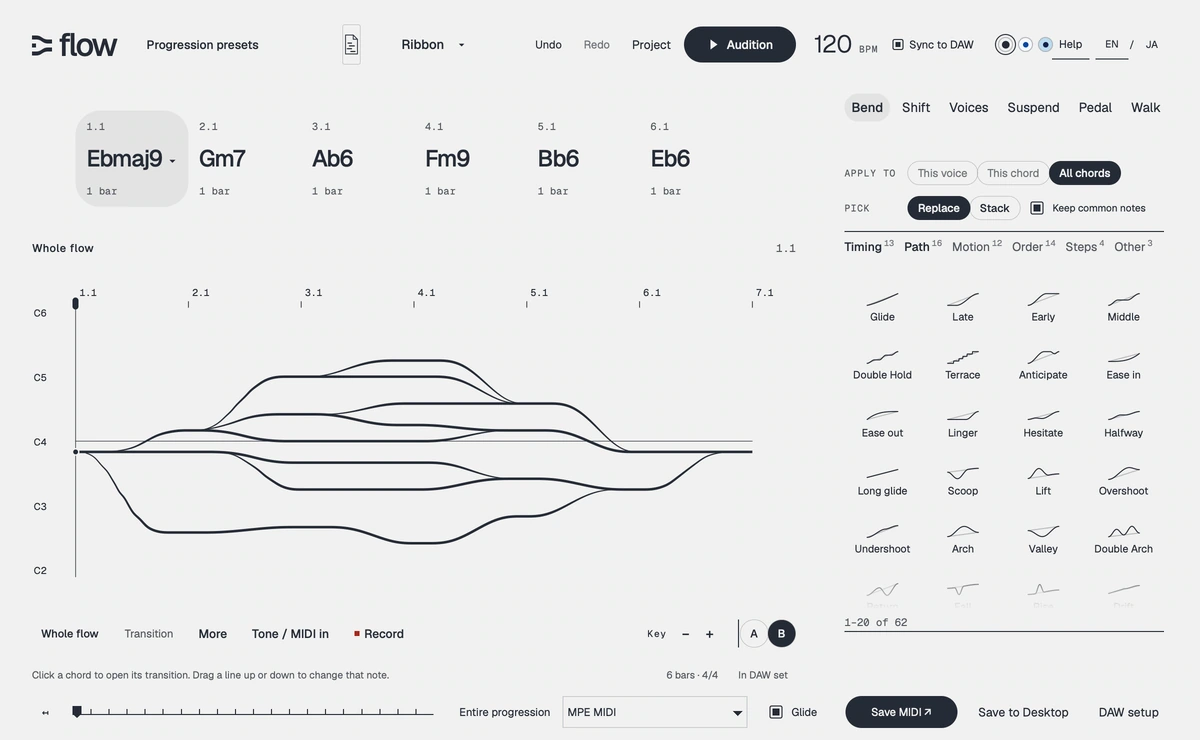
Every note of a chord is a line. You draw how each one slides into the next chord.
Frond Flow plays a chord progression as lines. Between two chords, each voice travels to its next note, and you decide how: early or late, straight or curved, held halfway, with a wobble on arrival. One note can open into several voices, and several voices can close onto one. Pick one of 184 progressions, drop in a MIDI file or record chords from your keyboard, then click a shape and hear it on your own progression before you keep it. Flow follows your DAW's tempo. It plays with its own sounds, or with an instrument of yours loaded inside Flow (Audio Unit on Mac, VST3 on Windows), so one track is enough. When you want the result in your DAW, drag the strip at the bottom of the window onto a track, as MIDI or as audio.
Bend a note on your phone, or use the full set of demo controls on a computer. No installation needed.
On saleDemo video coming soon.
What it does
What FLOW does and how it works inside.
496 ways to slide
62 shapes, each at 8 strengths: smooth glide, late glide, early arrival, midpoint hold, stepped glide, overshoot, ripple, entry vibrato, passing tone and more. Apply a shape to one transition, to the voices you pick, or to every chord at once, and keep the notes two chords share where they are.
Voices that split and meet
A single note can open into up to eight voices on the way to the next chord, and several voices can land on one note. 256 voice changes and 256 shift patterns (raise the bass, spread the outer voices, alternate up and down) work the same way. Suspend (32), Pedal (24) and Walk (32) make one voice resolve late, stay on its note, or walk through the key.
Draw it yourself
Click a chord to open its transition. Select a line and drag it, add points, or trace a new curve with the mouse. Undo, redo and an A/B pair let you compare two versions.
Start from 184 progressions, or your own
40 of them are sorted by style (Ambient / Film, Jazz / Neo-soul, Pop / Ballad, Dark / Tension, Glide) and already bend on every chord. The other 144 are basic, extended, harmony-shift, branching, bowed and fast. Or drop a .mid file on the window, or press Record and play chords on your keyboard: Flow counts you in, plays a click and reads the chords.
In time with your DAW
Start the DAW and Flow plays from bar 1 at the project tempo. Turn Sync to DAW off and Flow keeps its own BPM. Your edits are saved with the project. Built in: five sounds (Ribbon, Bow, Sine, Triangle, Reed) and eight keys (Felt Piano, Soft Upright, Tine EP, Reed EP, Soft Celesta, Wood Keys, Harp, Soft Keys), with tone, reverb and pitch controls.
Your own instruments too
Choose Sound at the top of the window and pick an instrument of yours: Audio Unit on Mac, VST3 on Windows. Flow loads it inside itself and plays it, so the progression and the instrument live on one track. Instruments that support MPE bend each voice on its own; for the others, the Sound menu shows how Flow will play them. On a Mac, VST3 instruments can't be loaded inside Flow; use their Audio Unit version.
Seven ways into your DAW
Drag the strip at the bottom onto a track, click Save, or Save to Desktop: Live clip, Mix (one WAV), Stems (a WAV per voice), Per-voice MIDI, Notes-only MIDI, MPE MIDI or 16-channel MIDI. Flow picks the format that suits your instrument, and you can change it.
English or Japanese, with Help
Switch the window between English and Japanese, and Flow remembers your choice. Turn Help on to show short lines that explain each part, and turn it off once you know your way around.
How it works
- You bring
a progression, a MIDI file, or chords you play
- It does
slides each voice into the next chord the way you shape it
- You get
a moving progression in your DAW, played by Flow or by your own instrument, or dragged out as MIDI or audio
Screens
Click a screen to see it full size.
Explore product
- Price
- Launch price $45 (until November 27, 2026 (JST), then $49)
- Release date
- November 18, 2026
- Systems
- macOS 12+ (Apple silicon, Intel) · Windows 10 / 11 (64-bit): VST3 (needs Microsoft Edge WebView2)
One purchase covers both Mac and Windows. - Formats
- Audio Unit · VST3
- Status
- On sale
Questions
Which DAWs does it work in?
Any DAW that loads Audio Unit or VST3 instruments on macOS, or VST3 instruments on Windows, such as Logic Pro, Ableton Live, Bitwig Studio, Reaper, Cubase and Studio One.
Is there a Windows version?
Yes. Frond Flow runs on Windows 10 / 11 (64-bit) as a VST3 plug-in. It needs the Microsoft Edge WebView2 Runtime, which Windows 11 and most Windows 10 PCs already have. One purchase covers both Mac and Windows.
Can I hear the slides on my own synth?
Yes. Choose Sound at the top of Flow and pick your instrument (Audio Unit on Mac, VST3 on Windows). Flow plays it inside itself, in time with the DAW, on the same track. With an MPE instrument each voice bends on its own; for other instruments, the Sound menu shows how Flow will play them.
Can I use VST3 instruments inside Flow?
On Windows, yes. On a Mac, no: use the Audio Unit version of the instrument, or drag the progression out of Flow onto the instrument's track as MIDI.
Can I get the progression as a MIDI clip or audio?
Yes. Drag the strip at the bottom of the window onto a track, or click Save. Flow picks the format that suits your instrument, and the menu offers all seven: Live clip, Mix (one WAV), Stems, Per-voice MIDI, Notes-only MIDI, MPE MIDI and 16-channel MIDI.
Do I need a MIDI clip to make it play?
No. Press play in your DAW and Flow plays its progression from bar 1. With the DAW stopped, use Audition inside Flow.
Other products
 CUTA glitch sampler for slicing and rearranging loops
 MOSAICRebuild rhythms with recorded materials
 SPRIG16 arpeggios × 125 chord progressions
 WEFTA phase-modulation synth that weaves phrases into held notes
 BUBBLE STUDIOA bubble-physics instrument and effect
 ODD PARTSA circuit instrument and effect with real and imaginary parts
 SIX MATERIALSSix keyboard instruments shaped by materials
 FIELDA noise and glitch machine that follows your track
 RELAYA rhythm machine built from networks and rules
 COLONYAn instrument built on cellular automata